Hi,
I'd like to mowe objects with the move tool in stud.io but at the moment
the movement is by jumps of 20 units. Is it possible to change this so I can
get fine movements please ?
Hi,
I'd like to mowe objects with the move tool in stud.io but at the moment
the movement is by jumps of 20 units. Is it possible to change this so I can
get fine movements please ?
If you have other questions, the dedicated forum for Studio and PartDesigner
is https://forum.bricklink.com/ (hover over the red Studio icon on every page,
then click “Studio Forum”).
Hi,
I'd like to mowe objects with the move tool in stud.io but at the moment
the movement is by jumps of 20 units. Is it possible to change this so I can
get fine movements please ?
If you have other questions, the dedicated forum for Studio and PartDesigner
is https://forum.bricklink.com/ (hover over the red Studio icon on every page,
then click “Studio Forum”).
Thank you, I'm sorry I posted at the wrong place. I didn't find the stud.io
section.
I will try to get a look and understand what is explain as english is not my
birth language. Thanks
I've experienced this frustration as well. A few methods I try to get around
this behavior (with varying degrees of success) are:
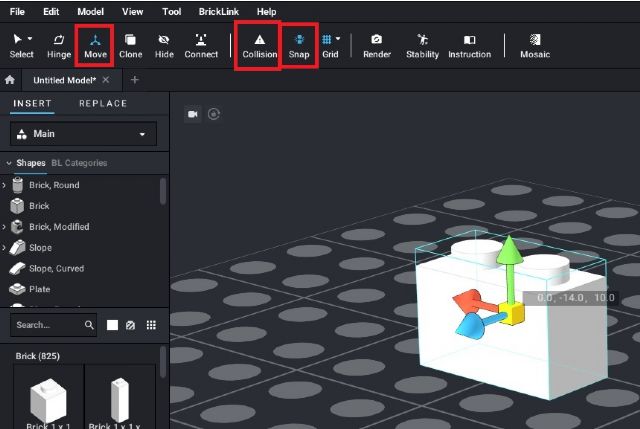
1. Select the 'Move' button (third from the left in the ribbon across
the top) and use each individual arrow (green, blue, red) as needed; image attached
below for reference.
2. Turn off 'Collision' (seventh from the left in the ribbon across the
top), then turn it back on after the connection is made; image attached below
for reference.
3. Turn off 'Snap' (eighth from the left in the ribbon across the top)
until the piece is near where I need it, then try turning it back on; image attached
below for reference.
4. Move a larger piece I want to connect the new piece to make the connection
then move the pair back to the place where the larger piece was located.
5. Selecting many pieces and using the ';Create Into Submodel' (bottom
right hand corner of the display near the Part list) so many pieces are basically
treated as one. If this doesn't immediately help it may allow movement of
the group of pieces allowing quicker connection of the new piece.
6. Changing the view angle of the model I've built to get 'best'
view of where I want the new piece, then selecting the specific stud I want to
connect from/to on the new piece to help Studio know where I want a connection
made while moving the new piece.
Sometimes combinations of more than one approach allow the piece connections
to be made as well. Hope this help.
In Help, Grimm_joww writes:
Hi,
I'd like to mowe objects with the move tool in stud.io but at the moment
the movement is by jumps of 20 units. Is it possible to change this so I can
get fine movements please ?
You can also click on the text box containing the numbers/coordinates and edit
them directly, in fractions of LDU if you wish.
Hi, thank you. I know this but sometimes it could be easier to move with the
mouse than calculating coordinates. That's why I was asking for a way to
do this with precision/
Hi,
I'm sorry if I don't understand your answer perfectly. I know all of
the buttons and I'm not especially trying to connect parts. Sometimes I just
need to move them with precision and can't do this. Fortunately, the alt+arrow
trick mentionned by SylvainLS works. I was just obcessed to do this with the
mouse.
REgards
In Help, noid55 writes:
Hi Grimm_joww,
I've experienced this frustration as well. A few methods I try to get around
this behavior (with varying degrees of success) are:
1. Select the 'Move' button (third from the left in the ribbon across
the top) and use each individual arrow (green, blue, red) as needed; image attached
below for reference.
2. Turn off 'Collision' (seventh from the left in the ribbon across the
top), then turn it back on after the connection is made; image attached below
for reference.
3. Turn off 'Snap' (eighth from the left in the ribbon across the top)
until the piece is near where I need it, then try turning it back on; image attached
below for reference.
4. Move a larger piece I want to connect the new piece to make the connection
then move the pair back to the place where the larger piece was located.
5. Selecting many pieces and using the ';Create Into Submodel' (bottom
right hand corner of the display near the Part list) so many pieces are basically
treated as one. If this doesn't immediately help it may allow movement of
the group of pieces allowing quicker connection of the new piece.
6. Changing the view angle of the model I've built to get 'best'
view of where I want the new piece, then selecting the specific stud I want to
connect from/to on the new piece to help Studio know where I want a connection
made while moving the new piece.
Sometimes combinations of more than one approach allow the piece connections
to be made as well. Hope this help.
In Help, Grimm_joww writes:
Hi,
I'd like to mowe objects with the move tool in stud.io but at the moment
the movement is by jumps of 20 units. Is it possible to change this so I can
get fine movements please ?


 France, Auvergne-Rhône-Alpes


 USA, Arizona