I have a buyer who can't see the pay button next to the order he placed in
my store.
On 2 occasions I have found that the status is set to paid in the edit order
page (the line goes grey) even though he has not paid. I have changed it back
and sent a new invoice to him each time.
I have now changed it back to not yet paid again and resent the invoice for the
3rd time any ideas as to why this is happening or is it user error on the buyers
side, he is a new buyer that joined in March and has only made a couple of purchases
as his feedback is low.
I have a buyer who can't see the pay button next to the order he placed in
my store.
On 2 occasions I have found that the status is set to paid in the edit order
page (the line goes grey) even though he has not paid. I have changed it back
and sent a new invoice to him each time.
I have now changed it back to not yet paid again and resent the invoice for the
3rd time any ideas as to why this is happening or is it user error on the buyers
side, he is a new buyer that joined in March and has only made a couple of purchases
as his feedback is low.
Thanks
Maybe the buyer chose PayPal (not onsite) and hit the paid button?
The payment option that was chosen should be visible in the edit order detail.
Maybe the buyer chose PayPal (not onsite) and hit the paid button?
The payment option that was chosen should be visible in the edit order detail.
He hasn’t paid direct through PayPal, he doesn’t want to, I suggested to do that
paying for goods and then I can update the order here to say it’s paid so it
all stays above board etc, he won’t even consider it as he wants to keep it all
in house?? Even though it will all be in house just paid via the email address
(I’ve had a few new people do it that way with no issues as BrickLink still gets
it’s fees etc)
it then went to paid again so I reset it and he didn’t pay and I then found it
was set as paid for the third time!
Not sure what else to do I keep explaining to him what he needs to do yet I get
no response, I don’t want to just cancel the order as I’ll prob end up with a
negative for no fault of my own, and they don’t get removed very easily! I did
start an NPB and he responded with it’s all my fault yet all I do is send an
invoice with the amount and the email to pay it to.
He hasn’t paid direct through PayPal, he doesn’t want to, I suggested to do that
paying for goods and then I can update the order here to say it’s paid so it
all stays above board etc, he won’t even consider it as he wants to keep it all
in house??
That doesn't make much sense. Surely keeping it all in-house would suggest
paying by Paypal onsite using the pay now button?
start an NPB and he responded with it’s all my fault yet all I do is send an
invoice with the amount and the email to pay it to.
You may well have to NPB, put a comment that the buyer has been given several
options to pay and has not done so. If he replies it will take longer to complete,
but you can't make hime pay. Don't cancel the NPB or send another invoice
as this will reset the timer.
That doesn't make much sense. Surely keeping it all in-house would suggest
paying by Paypal onsite using the pay now button?
This is the problem, he doesn't seem to have a pay now button, but each time
I send an invoice it ends up as paid in the edit order section and the order
line goes grey.
Some people do just copy the email address from the invoice and pay via paypal,
I get the notification they have paid in paypal but it doesn't register on
here, I then go into edit order set it as paid, also set it as paid on the order
screen and then finish the order process as normal.
He doesn't want to do that for some reason or other!
You may well have to NPB, put a comment that the buyer has been given several
options to pay and has not done so. If he replies it will take longer to complete,
but you can't make hime pay. Don't cancel the NPB or send another invoice
as this will reset the timer.
I'll give him until tonight and then start the NPB again, this has been going
on for a week now!
Have you checked your paypal account to see if there is an unknown payment? It
might be that he has paid, but then again it might be that he is hoping that
you see it is paid on bricklink and send the order without checking it has been
paid.
I have a buyer who can't see the pay button next to the order he placed in
my store.
On 2 occasions I have found that the status is set to paid in the edit order
page (the line goes grey) even though he has not paid. I have changed it back
and sent a new invoice to him each time.
I have now changed it back to not yet paid again and resent the invoice for the
3rd time any ideas as to why this is happening or is it user error on the buyers
side, he is a new buyer that joined in March and has only made a couple of purchases
as his feedback is low.
Thanks
Can you post a screenshot like this from the order?
I have a buyer who can't see the pay button next to the order he placed in
my store.
On 2 occasions I have found that the status is set to paid in the edit order
page (the line goes grey) even though he has not paid. I have changed it back
and sent a new invoice to him each time.
I have now changed it back to not yet paid again and resent the invoice for the
3rd time any ideas as to why this is happening or is it user error on the buyers
side, he is a new buyer that joined in March and has only made a couple of purchases
as his feedback is low.
Thanks
Can you post a screenshot like this from the order?
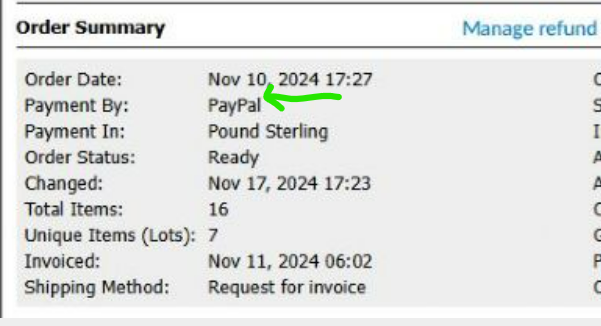
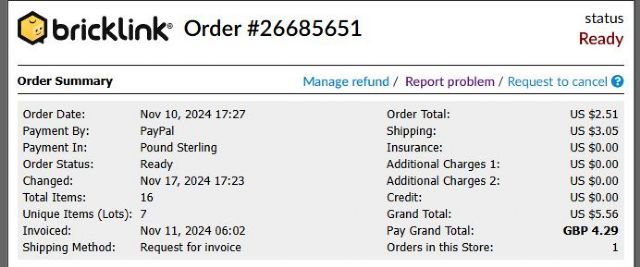
Here is a screenshot, it is currently still at ready and the order line is white
as he has not done anything since I changed it back to "not yet paid"
last night,
As you can see from the other shots, his line is still white and under the edit
order it is set as "not yet paid" when that changes to paid the line
goes grey even though it still says ready under the order status. I know buyers
can change it to paid even though they haven't paid but for it to happen
3 times!
He has just emailed me with a screenshot, he has no pay button under his orders
even though everything is correct my end.
I have a buyer who can't see the pay button next to the order he placed in
my store.
On 2 occasions I have found that the status is set to paid in the edit order
page (the line goes grey) even though he has not paid. I have changed it back
and sent a new invoice to him each time.
I have now changed it back to not yet paid again and resent the invoice for the
3rd time any ideas as to why this is happening or is it user error on the buyers
side, he is a new buyer that joined in March and has only made a couple of purchases
as his feedback is low.
Thanks
Can you post a screenshot like this from the order?
Here is a screenshot, it is currently still at ready and the order line is white
as he has not done anything since I changed it back to "not yet paid"
last night,
As you can see from the other shots, his line is still white and under the edit
order it is set as "not yet paid" when that changes to paid the line
goes grey even though it still says ready under the order status. I know buyers
can change it to paid even though they haven't paid but for it to happen
3 times!
He has just emailed me with a screenshot, he has no pay button under his orders
even though everything is correct my end.
He has no pay button because the payment type is "PayPal" and not "PayPal
(Onsite)"
He has no pay button because the payment type is "PayPal" and not "PayPal
(Onsite)"
How do I check that? I've never had this issue before.
If he had chosen PayPal Onsite, this line would read "PayPal (Onsite)".
I think this can be changed if the payment status is "Not Yet Paid" and
you edit the order. I'm honestly not sure as I've never had an off-site
payment method.
I have a buyer who can't see the pay button next to the order he placed in
my store.
On 2 occasions I have found that the status is set to paid in the edit order
page (the line goes grey) even though he has not paid. I have changed it back
and sent a new invoice to him each time.
I have now changed it back to not yet paid again and resent the invoice for the
3rd time any ideas as to why this is happening or is it user error on the buyers
side, he is a new buyer that joined in March and has only made a couple of purchases
as his feedback is low.
Thanks
Can you post a screenshot like this from the order?
Here is a screenshot, it is currently still at ready and the order line is white
as he has not done anything since I changed it back to "not yet paid"
last night,
As you can see from the other shots, his line is still white and under the edit
order it is set as "not yet paid" when that changes to paid the line
goes grey even though it still says ready under the order status. I know buyers
can change it to paid even though they haven't paid but for it to happen
3 times!
He has just emailed me with a screenshot, he has no pay button under his orders
even though everything is correct my end.
The problem is the payment method selected, change in the order edit page the
method dropdown menu to the one that says Paypal Onsite and save, then send a
new invoice, after that the buyer will see the PAY button.
The problem is the payment method selected, change in the order edit page the
method dropdown menu to the one that says Paypal Onsite and save, then send a
new invoice, after that the buyer will see the PAY button.
I've just checked a couple of the other orders that I'm waiting on payments
etc and they are all paypal onsite.
Not sure how that got changed as I've never clicked that bit before, I wonder
if it was when it get changed to paid it defaults to paypal.
The problem is the payment method selected, change in the order edit page the
method dropdown menu to the one that says Paypal Onsite and save, then send a
new invoice, after that the buyer will see the PAY button.
I've just checked a couple of the other orders that I'm waiting on payments
etc and they are all paypal onsite.
Not sure how that got changed as I've never clicked that bit before, I wonder
if it was when it get changed to paid it defaults to paypal.
I'll message the buyer and get this sorted.
Many thanks for all the help the forum wins again
Probably the buyer choose it at checkout.
To prevent this many years ago I disabled the offsite option at the bottom of
this page:
The problem is the payment method selected, change in the order edit page the
method dropdown menu to the one that says Paypal Onsite and save, then send a
new invoice, after that the buyer will see the PAY button.
I've just checked a couple of the other orders that I'm waiting on payments
etc and they are all paypal onsite.
Not sure how that got changed as I've never clicked that bit before, I wonder
if it was when it get changed to paid it defaults to paypal.
I'll message the buyer and get this sorted.
Many thanks for all the help the forum wins again
Probably the buyer choose it at checkout.
To prevent this many years ago I disabled the offsite option at the bottom of
this page:
Thanks, I’ll have a look at that a bit later, managed to get it al sorted and
the buyer has paid.


 United Kingdom, England


 Netherlands, Drenthe

 Spain, Comunidad Valenciana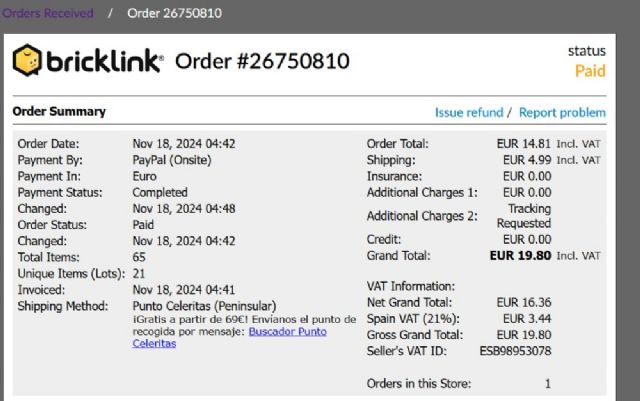
)
)
)
)
 USA, New Jersey