A coustomer reaced out and is having some problems checking out from our store:
Changes on Your Cart
It seems like something has been changed on your cart item. Please go to the
cart and update your items: ORDER_ITEM_TOTAL_MISMATCHED
we have tryed to go from a different account an put the same parts in our cart
and for us it works perfectly.
The only difference we tought about is that we are a euro store and he is located
in australia with a different currency, could that have something to du with
the problem
A coustomer reaced out and is having some problems checking out from our store:
Changes on Your Cart
It seems like something has been changed on your cart item. Please go to the
cart and update your items: ORDER_ITEM_TOTAL_MISMATCHED
Buyer should be logged in when he adds to his cart, is it the case?
Could it be the total cart was below AUD 1000, then after addition above AUD
1000?
Otherwise:
* buyer scratches the full cart and redo it in one go (as being logged in),
* why not the buyer simply place a first order, use a manual opened shipping
method like "Invoice me manually", and then place the remaining of the
order?
This might be a silly question, bu how do I enable Invoice me manually?
Or is that a function that's always on?
In Technical Issues, 1001bricks writes:
In Technical Issues, Bitmix writes:
Hi
A coustomer reaced out and is having some problems checking out from our store:
Changes on Your Cart
It seems like something has been changed on your cart item. Please go to the
cart and update your items: ORDER_ITEM_TOTAL_MISMATCHED
Buyer should be logged in when he adds to his cart, is it the case?
Could it be the total cart was below AUD 1000, then after addition above AUD
1000?
Otherwise:
* buyer scratches the full cart and redo it in one go (as being logged in),
* why not the buyer simply place a first order, use a manual opened shipping
method like "Invoice me manually", and then place the remaining of the
order?
A coustomer reaced out and is having some problems checking out from our store:
Changes on Your Cart
It seems like something has been changed on your cart item. Please go to the
cart and update your items: ORDER_ITEM_TOTAL_MISMATCHED
we have tryed to go from a different account an put the same parts in our cart
and for us it works perfectly.
The only difference we tought about is that we are a euro store and he is located
in australia with a different currency, could that have something to du with
the problem
Does anybody have a solution for this?
thanks
Best regards
Team Bitmix
Usually this happens when the buyers has say 4 items of part X in his cart, while
you had 4 for sale, but someone else bought 1 so you won't have enough now.
The simple solution is given in the message itself: go to the cart, review the
amounts of each lot (the problem lots will bare a message) and accept the changes
by clicking on [update cart].
Usually this happens when the buyers has say 4 items of part X in his cart, while
you had 4 for sale, but someone else bought 1 so you won't have enough now.
The simple solution is given in the message itself: go to the cart, review the
amounts of each lot (the problem lots will bare a message) and accept the changes
by clicking on [update cart].
That was my first thought as well. I personally haven't encountered this
outside of testing my own store so I didn't submit the post since I wasn't
100% sure.
Having parts in your cart doesn't reserve them. It's entirely possible
they had them in their cart for a few days and in the mean time someone swooped
in and bought some of the parts lowering your inventory numbers to below what
the new buyer is trying to purchase.
Thank you all for trying to help us, we added manual invoice and hopes that will
do it
In Technical Issues, Bitmix writes:
Hi
A coustomer reaced out and is having some problems checking out from our store:
Changes on Your Cart
It seems like something has been changed on your cart item. Please go to the
cart and update your items: ORDER_ITEM_TOTAL_MISMATCHED
we have tryed to go from a different account an put the same parts in our cart
and for us it works perfectly.
The only difference we tought about is that we are a euro store and he is located
in australia with a different currency, could that have something to du with
the problem


 Finland, Pohjanmaa


 France, Provence-Alpes-Côte d'Azur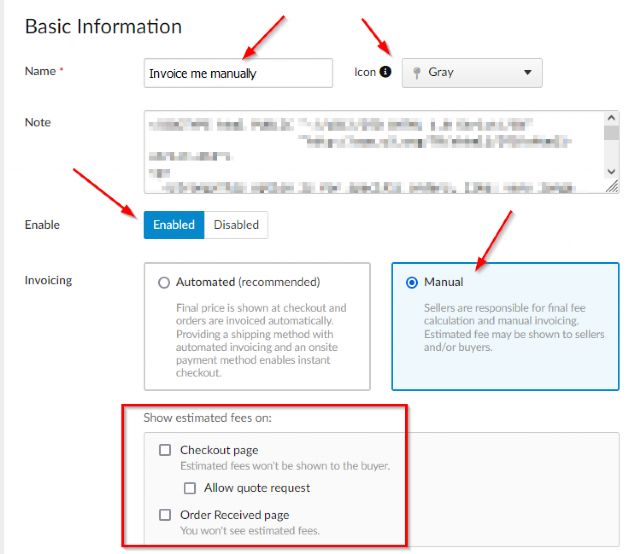
 Netherlands, Groningen
 USA, Ohio