Otherwise you will run into other problems
Somehow weird that you haven't experienced errors before.
odd question but do you perhaps know how to update bricksync? I've got the
new files from GitHub as I've been running an old version as well but have
never updated it before so am not sure if there is anything special i should
keep in mind or simply run it as if its a new install
Otherwise you will run into other problems
Somehow weird that you haven't experienced errors before.
odd question but do you perhaps know how to update bricksync? I've got the
new files from GitHub as I've been running an old version as well but have
never updated it before so am not sure if there is anything special i should
keep in mind or simply run it as if its a new install
Just unpack and overwrite the old files, your API key etc will still stay the
same.
Otherwise you will run into other problems
Somehow weird that you haven't experienced errors before.
odd question but do you perhaps know how to update bricksync? I've got the
new files from GitHub as I've been running an old version as well but have
never updated it before so am not sure if there is anything special i should
keep in mind or simply run it as if its a new install
Just unpack and overwrite the old files, your API key etc will still stay the
same.
Otherwise you will run into other problems
Somehow weird that you haven't experienced errors before.
odd question but do you perhaps know how to update bricksync? I've got the
new files from GitHub as I've been running an old version as well but have
never updated it before so am not sure if there is anything special i should
keep in mind or simply run it as if its a new install
Just unpack and overwrite the old files, your API key etc will still stay the
same.
perfect! thanks for letting me know!
for anyone curious, I downloaded, extracted the file, and replaced my old "bricksync-win64"
file with the new one. this saved most of the info however I had to manually
copy and paste my settings in the config file from my old one to the new one
Otherwise you will run into other problems
Somehow weird that you haven't experienced errors before.
odd question but do you perhaps know how to update bricksync? I've got the
new files from GitHub as I've been running an old version as well but have
never updated it before so am not sure if there is anything special i should
keep in mind or simply run it as if its a new install
Just unpack and overwrite the old files, your API key etc will still stay the
same.
perfect! thanks for letting me know!
for anyone curious, I downloaded, extracted the file, and replaced my old "bricksync-win64"
file with the new one. this saved most of the info however I had to manually
copy and paste my settings in the config file from my old one to the new one
Only the .exe file would have to be replaced.
All other files can be left untouched.
When an update is there, I rename the current exe and add the date, then copy
the new exe file and start it.
After a week or so I delete the old exe, at least that was the idea, I mostly
forget and only do it the next time there is an update
Otherwise you will run into other problems
Somehow weird that you haven't experienced errors before.
odd question but do you perhaps know how to update bricksync? I've got the
new files from GitHub as I've been running an old version as well but have
never updated it before so am not sure if there is anything special i should
keep in mind or simply run it as if its a new install
Just unpack and overwrite the old files, your API key etc will still stay the
same.
perfect! thanks for letting me know!
for anyone curious, I downloaded, extracted the file, and replaced my old "bricksync-win64"
file with the new one. this saved most of the info however I had to manually
copy and paste my settings in the config file from my old one to the new one
Only the .exe file would have to be replaced.
All other files can be left untouched.
When an update is there, I rename the current exe and add the date, then copy
the new exe file and start it.
After a week or so I delete the old exe, at least that was the idea, I mostly
forget and only do it the next time there is an update
Interesting! I’ll try that next time. Thanks for the info!
I recommend that you try the Brick Seller app. In addition to the many Inventory
and Order Management features, Brick Seller will continuously sync your BrickLink
and Brick Owl inventory with your incoming orders from both marketplaces.
After you register for a free 45 day trial of Brick Seller (and your BrickLink
Inventory and Order data has been loaded into the Brick Seller database via the
BrickLink API), you can enable the Brick Owl integration features of Brick Seller
by entering your Brick Owl API key near the top of the Options tab in Brick Seller.
You can optionally check the checkbox to have Brick Seller sync your BrickLink
and Brick Owl inventory with your incoming orders from both marketplaces (you
should stop using any other inventory syncing tool first).
I would also recommend watching the demonstration videos (available from the
Home page of Brick Seller) that explain the many features of Brick Seller.
I also have a YouTube channel (https://www.youtube.com/@rixbrix) where I have
several videos where I give some tips and advice from operating BrickLink and
Brick Owl stores for over 17 years and show how I use Brick Seller to manage
my inventory and process orders.
Please feel free to contact me if you have any questions or problems getting
started using Brick Seller.
Thanks,
Rick
In Related Software, Peter.D writes:
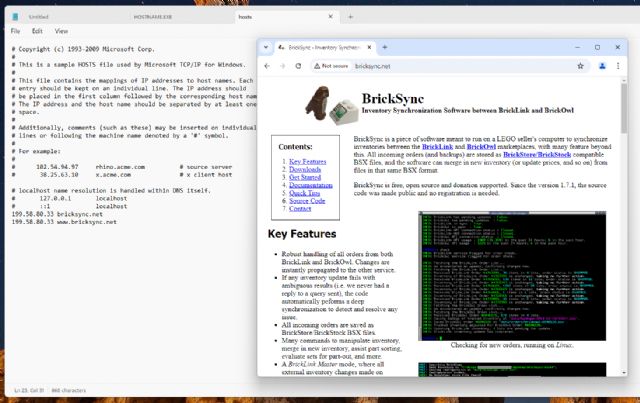
Anyone else having troubles with bricksync?
Here it doesn't work anymore, it just does nothing...
This is a temporary fix at best until the site goes down.
The domain has status: clientHold "This status code tells your domain's
registry to not activate your domain in the DNS and as a consequence, it will
not resolve. It is an uncommon status that is usually enacted during legal disputes,
non-payment, or when your domain is subject to deletion."


 Belgium, Limburg


 Canada, Ontario
 Netherlands, Drenthe


 United Kingdom, England

 USA, Wisconsin