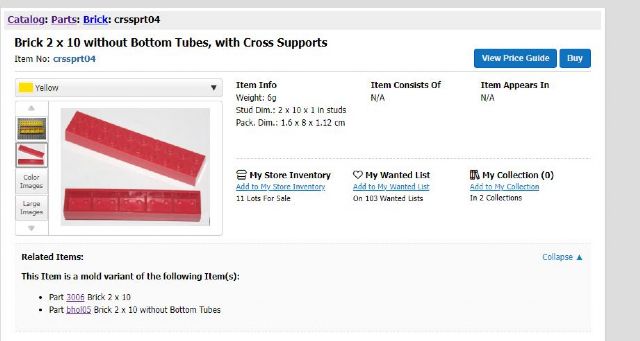
Regarding Brick 2 x 10 without Bottom Tubes, with Cross Supports
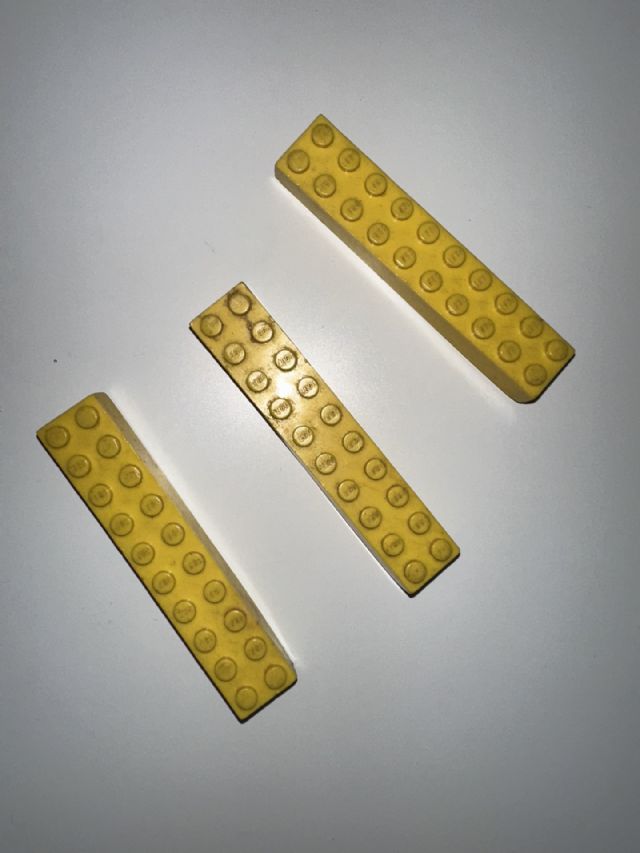
I have 3 pieces of this brick in front of me in color yellow. It seems not to
exist in the database (only blue, white and red as far as I can see).
Thank you for adding.
Kind regards,
Menno
"Yellow" will not show up in the color dropdown list or "Known Colors"
area of the catalog detail page if the part is not listed in any set inventories.
If you are trying to add them to the "My Collection" feature, it only
works with colors listed in the "Known Colors" area. Since this part
doesn't have any, no colors will come up for it. I think that is supposed
to possibly change in the future, but for now you can only add it to "My
Collection" with a note that they are yellow.
Hello Randy, thank you for the clarification on how I can find colors that at
first do not seem to exist in de catalog. I will check 'color images'
from now
If I understand you correctly: this part in yellow is not mentioned in any set
inventory.
Do you mean that 'Item appears in = N/A'? I am asking as Red White and
Blue also have 'N/A' in 'Item appears in'.
Btw: after I click on the Yellow color image on
Catalog: Parts: Brick: crssprt04: Color Images
I am directed to the same page as first but now WITH the yellow color and photo
of a yellow brick. See screenprint attached.
Kind regards,
Menno
In Catalog, randyf writes:
In Catalog Requests, mzmzmz writes:
Regarding Brick 2 x 10 without Bottom Tubes, with Cross Supports
I have 3 pieces of this brick in front of me in color yellow. It seems not to
exist in the database (only blue, white and red as far as I can see).
Thank you for adding.
Kind regards,
Menno
"Yellow" will not show up in the color dropdown list or "Known Colors"
area of the catalog detail page if the part is not listed in any set inventories.
If you are trying to add them to the "My Collection" feature, it only
works with colors listed in the "Known Colors" area. Since this part
doesn't have any, no colors will come up for it. I think that is supposed
to possibly change in the future, but for now you can only add it to "My
Collection" with a note that they are yellow.
Hello Randy, thank you for the clarification on how I can find colors that at
first do not seem to exist in de catalog. I will check 'color images'
from now
If I understand you correctly: this part in yellow is not mentioned in any set
inventory.
Do you mean that 'Item appears in = N/A'?
Yes, exactly.
I am asking as Red White and Blue also have 'N/A' in 'Item appears in'.
Btw: after I click on the Yellow color image on
Catalog: Parts: Brick: crssprt04: Color Images
I am directed to the same page as first but now WITH the yellow color and photo
of a yellow brick. See screenprint attached.
I did not know that. Good to know! Thanks!
Kind regards,
Menno
In Catalog, randyf writes:
In Catalog Requests, mzmzmz writes:
Regarding Brick 2 x 10 without Bottom Tubes, with Cross Supports
I have 3 pieces of this brick in front of me in color yellow. It seems not to
exist in the database (only blue, white and red as far as I can see).
Thank you for adding.
Kind regards,
Menno
"Yellow" will not show up in the color dropdown list or "Known Colors"
area of the catalog detail page if the part is not listed in any set inventories.
If you are trying to add them to the "My Collection" feature, it only
works with colors listed in the "Known Colors" area. Since this part
doesn't have any, no colors will come up for it. I think that is supposed
to possibly change in the future, but for now you can only add it to "My
Collection" with a note that they are yellow.
Hello Randy, thank you for the clarification on how I can find colors that at
first do not seem to exist in de catalog. I will check 'color images'
from now
If I understand you correctly: this part in yellow is not mentioned in any set
inventory.
Do you mean that 'Item appears in = N/A'? I am asking as Red White and
Blue also have 'N/A' in 'Item appears in'.
Btw: after I click on the Yellow color image on
Catalog: Parts: Brick: crssprt04: Color Images
I am directed to the same page as first but now WITH the yellow color and photo
of a yellow brick. See screenprint attached.
Kind regards,
Menno
In Catalog, randyf writes:
In Catalog Requests, mzmzmz writes:
Regarding Brick 2 x 10 without Bottom Tubes, with Cross Supports
I have 3 pieces of this brick in front of me in color yellow. It seems not to
exist in the database (only blue, white and red as far as I can see).
Thank you for adding.
Kind regards,
Menno
"Yellow" will not show up in the color dropdown list or "Known Colors"
area of the catalog detail page if the part is not listed in any set inventories.
If you are trying to add them to the "My Collection" feature, it only
works with colors listed in the "Known Colors" area. Since this part
doesn't have any, no colors will come up for it. I think that is supposed
to possibly change in the future, but for now you can only add it to "My
Collection" with a note that they are yellow.


 Netherlands, Utrecht

)
)
 USA, Ohio