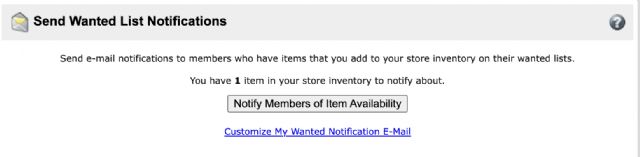
Is there a way to see what I'm sending out wanted list notifications for?
Whenever I see the notification that I have parts to notify people about, I'm
never sure what it's for.
I've been working on some part outs today putting the items in to storage
and in the process I found 4 extra 2x16 plates that had a zero count that were
in Stockroom A (so I changed qty and un-clicked SrA), and there was also 25 orange
2x2 plates that were incorrectly marked as being SrA, so I un-clicked SrA.
... So what did I notify people about? Probably the 2x16s?
Is there a way to see what I'm sending out wanted list notifications for?
Whenever I see the notification that I have parts to notify people about, I'm
never sure what it's for.
I've been working on some part outs today putting the items in to storage
and in the process I found 4 extra 2x16 plates that had a zero count that were
in Stockroom A (so I changed qty and un-clicked SrA), and there was also 25 orange
2x2 plates that were incorrectly marked as being SrA, so I un-clicked SrA.
... So what did I notify people about? Probably the 2x16s?
I think the 2x2s. The 2x16s would not have been a new lot, they were "retained"
(either because you chose it or because of some weird transient error), that
is why they had a 0 quantity and were in Stockroom A. But the 2x2s might not
have been listed in your store before.
Is there a way to see what I'm sending out wanted list notifications for?
Whenever I see the notification that I have parts to notify people about, I'm
never sure what it's for.
I've been working on some part outs today putting the items in to storage
and in the process I found 4 extra 2x16 plates that had a zero count that were
in Stockroom A (so I changed qty and un-clicked SrA), and there was also 25 orange
2x2 plates that were incorrectly marked as being SrA, so I un-clicked SrA.
... So what did I notify people about? Probably the 2x16s?
While not full-proof, you can go into your store front, click on the black "Parts
(xxx lots)" and then sort by date - down. This will show you the newest lots,
the top one is highly likely the one you are notifying (same of course with minifigs,
sets etc).
While not full-proof, you can go into your store front, click on the black "Parts
(xxx lots)" and then sort by date - down. This will show you the newest lots,
the top one is highly likely the one you are notifying (same of course with minifigs,
sets etc).
I've done that before when I didn't have anything added but noticed the
notify prompt. And it goes a little deeper than just this specific example;
I'd generally like to see what I'm sending out when I do part outs.
(yes, I know I can scan the list before confirming an upload.)
Is there a way to see what I'm sending out wanted list notifications for?
Whenever I see the notification that I have parts to notify people about, I'm
never sure what it's for.
I've been working on some part outs today putting the items in to storage
and in the process I found 4 extra 2x16 plates that had a zero count that were
in Stockroom A (so I changed qty and un-clicked SrA), and there was also 25 orange
2x2 plates that were incorrectly marked as being SrA, so I un-clicked SrA.
... So what did I notify people about? Probably the 2x16s?
Where the 2x2 plate’s immediately uploaded to the stockroom if so they had not
been notified yet as they were not available when you uploaded them.
The 2x16 plates most likely already had been notified and were set to retain


 USA, Ohio



 Netherlands, Gelderland

 France, Provence-Alpes-Côte d'Azur
 Canada, Alberta