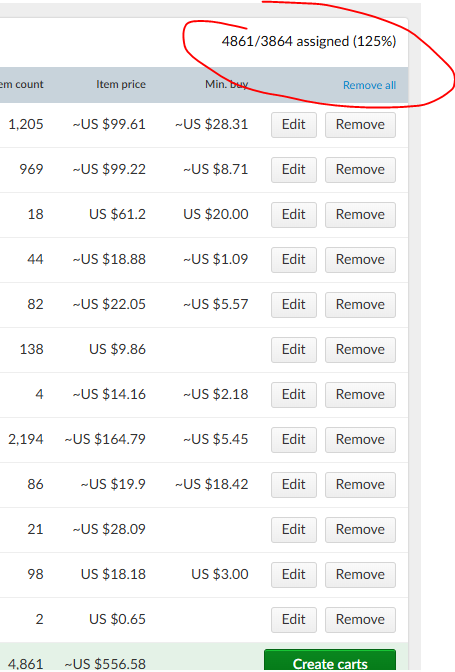
Why is the buy wanted list having me buy 125% of what I need? None of my purchases
from each store is below the min buy amount.
Hi,
This happens when the algorithm chooses “bulk lots.”
When a seller sets the “bulk” value for a lot, that means you can only buy this
part in multiples of N (or the whole lot).
There’s an “(xN)” next to the lot (in the store but also in the pre-carts).
So if you need 2 parts but the bulk is “x10,” you are actually buying 10 parts.
That’s sometimes cheaper than buying only 2 parts in another store.
If you don’t want to buy more parts than necessary, you’ll have to deselect the
stores and least-favourite them to prevent them from being chosen again.
BEWARE: it’s not because the percentage is above 100% that all your parts
have been found.
Check the Wanted Items tab on the left ((2) on the first pic here: https://www.bricklink.com/help.asp?helpID=2445
).
When the “Show Excluded” checkbox is not ticked, the “bought” items will be hidden.
That is, if there’s still items shown, then they have not been found.
(When the box is ticked, you’re looking for items with more than “0” under their
picture.)
Why is the buy wanted list having me buy 125% of what I need? None of my purchases
from each store is below the min buy amount.
Hi,
This happens when the algorithm chooses “bulk lots.”
When a seller sets the “bulk” value for a lot, that means you can only buy this
part in multiples of N (or the whole lot).
There’s an “(xN)” next to the lot (in the store but also in the pre-carts).
So if you need 2 parts but the bulk is “x10,” you are actually buying 10 parts.
That’s sometimes cheaper than buying only 2 parts in another store.
If you don’t want to buy more parts than necessary, you’ll have to deselect the
stores and least-favourite them to prevent them from being chosen again.
BEWARE: it’s not because the percentage is above 100% that all your parts
have been found.
Check the Wanted Items tab on the left ((2) on the first pic here: https://www.bricklink.com/help.asp?helpID=2445
).
When the “Show Excluded” checkbox is not ticked, the “bought” items will be hidden.
That is, if there’s still items shown, then they have not been found.
(When the box is ticked, you’re looking for items with more than “0” under their
picture.)
Thanks for the help SylvainLS! Saved me a lot of time


 USA, Connecticut


 France, Nouvelle-Aquitaine