Discussion Forum: Thread 358531

 Author: Ziegelmeister View Messages Posted By Ziegelmeister
 Posted: Jun 3, 2024 02:01
 Subject: Refunds and taxes
 Viewed: 135 times
 Topic: Taxes
 Report:
Cancel Message
Cancel
Reply to Message
Reply
BrickLink
ID Card

Ziegelmeister (624)

Location:  USA, Ohio
Member Since Contact Type Status
Aug 27, 2021 Contact Member Seller
Buying Privileges - OKSelling Privileges - OK
Seller Ships to My Country Store: Ziegelmarkt
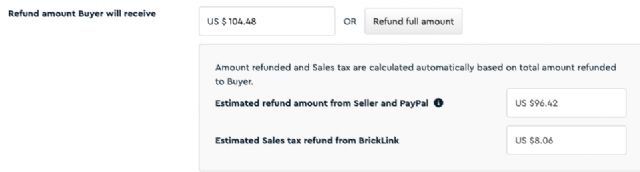
When you issue a refund, do you need to calculate in the taxes as well?

I have a buyer who asked to remove 22x of one item from an order which amounts
to ~$104.48 and they have a 9.25% state sales tax ($114.14). on the refund page,
if I just put in the $104.48, I get the attached image, which I interpret as
the buyer being shorted.
 
 Author: Ziegelmeister View Messages Posted By Ziegelmeister
 Posted: Jun 3, 2024 02:09
 Subject: Re: Refunds and taxes
 Viewed: 52 times
 Topic: Taxes
 Report:
Cancel Message
Cancel
Reply to Message
Reply
BrickLink
ID Card

Ziegelmeister (624)

Location:  USA, Ohio
Member Since Contact Type Status
Aug 27, 2021 Contact Member Seller
Buying Privileges - OKSelling Privileges - OK
Seller Ships to My Country Store: Ziegelmarkt
In Taxes, Ziegelmeister writes:
  When you issue a refund, do you need to calculate in the taxes as well?

I have a buyer who asked to remove 22x of one item from an order which amounts
to ~$104.48 and they have a 9.25% state sales tax ($114.14). on the refund page,
if I just put in the $104.48, I get the attached image, which I interpret as
the buyer being shorted.

And I know, I know; RTFM, but the manual doesn't clearly state what happens
on partial refunds. https://www.bricklink.com/help.asp?helpID=2467
 Author: peregrinator View Messages Posted By peregrinator
 Posted: Jun 3, 2024 06:36
 Subject: Re: Refunds and taxes
 Viewed: 74 times
 Topic: Taxes
 Report:
Cancel Message
Cancel
Reply to Message
Reply
BrickLink
ID Card

peregrinator (1122)

Location:  USA, New Jersey
Member Since Contact Type Status
Jan 21, 2003 Contact Member Seller
Buying Privileges - OKSelling Privileges - OK
Seller Ships to My Country Store: Faber Family Bricks
In Taxes, Ziegelmeister writes:
  In Taxes, Ziegelmeister writes:
  When you issue a refund, do you need to calculate in the taxes as well?

I have a buyer who asked to remove 22x of one item from an order which amounts
to ~$104.48 and they have a 9.25% state sales tax ($114.14). on the refund page,
if I just put in the $104.48, I get the attached image, which I interpret as
the buyer being shorted.

And I know, I know; RTFM, but the manual doesn't clearly state what happens
on partial refunds. https://www.bricklink.com/help.asp?helpID=2467

It's annoying but you have to put in the total w/tax. You might have to play
with the number a bit until you get the precise total for the buyer in the "Estimated
refund from seller and PayPal" box.
 Author: Ziegelmeister View Messages Posted By Ziegelmeister
 Posted: Jun 3, 2024 12:28
 Subject: Re: Refunds and taxes
 Viewed: 52 times
 Topic: Taxes
 Report:
Cancel Message
Cancel
Reply to Message
Reply
BrickLink
ID Card

Ziegelmeister (624)

Location:  USA, Ohio
Member Since Contact Type Status
Aug 27, 2021 Contact Member Seller
Buying Privileges - OKSelling Privileges - OK
Seller Ships to My Country Store: Ziegelmarkt
In Taxes, peregrinator writes:
  In Taxes, Ziegelmeister writes:
  In Taxes, Ziegelmeister writes:
  When you issue a refund, do you need to calculate in the taxes as well?

I have a buyer who asked to remove 22x of one item from an order which amounts
to ~$104.48 and they have a 9.25% state sales tax ($114.14). on the refund page,
if I just put in the $104.48, I get the attached image, which I interpret as
the buyer being shorted.

And I know, I know; RTFM, but the manual doesn't clearly state what happens
on partial refunds. https://www.bricklink.com/help.asp?helpID=2467

It's annoying but you have to put in the total w/tax. You might have to play
with the number a bit until you get the precise total for the buyer in the "Estimated
refund from seller and PayPal" box.

Got it, thank you.