I accidentally added pieces twice to my collection
How can I delete the double pieces? I wouldn't like to go
one by one through all the hundreds of pieces
I managed to remove the set, but when I remove the set, pieces
didn't go with it.
I accidentally added pieces twice to my collection
How can I delete the double pieces? I wouldn't like to go
one by one through all the hundreds of pieces
I managed to remove the set, but when I remove the set, pieces
didn't go with it.
Hi,
AFAIK, there’s no simple way to do that.
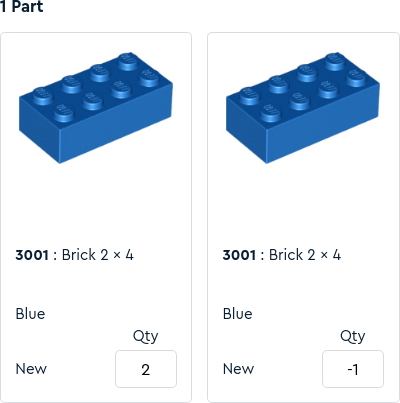
I thought about trying to trick the site: I imported an inventory of one part
with negative quantity… and I got this (see pic; note that the total is correct
2 + -1 = 1).
Not what you want.
So I think you’ll have to:
— go piece by piece,
— or start again (you can empty your whole collection by importing an empty file),
— or use a thrid-party tool, like BrickStore: download/export your collection,
import it in BrickStore, edit it there (you should be able to remove the set’s
inventory), then import it in your My Collection… or not, because BrickStore
has many features My Collection still doesn’t have.
I accidentally added pieces twice to my collection
How can I delete the double pieces? I wouldn't like to go
one by one through all the hundreds of pieces
I managed to remove the set, but when I remove the set, pieces
didn't go with it.
If it was a set you parted out you can do the -1 in the Quantity of sets: and
it will add negative qty of each item.
It works as I have had to do it myself in the past.
[…]
If it was a set you parted out you can do the -1 in the Quantity of sets: and
it will add negative qty of each item.
It works as I have had to do it myself in the past.


 Finland, Varsinais-Suomi


 France, Nouvelle-Aquitaine


 United Kingdom, England
