Discussion Forum: Thread 353895

 Author: daxio View Messages Posted By daxio
 Posted: Feb 13, 2024 12:44
 Subject: How remove purchases from want lists ?
 Viewed: 96 times
 Topic: Buying
 Report:
Cancel Message
Cancel
Reply to Message
Reply
BrickLink
ID Card

daxio (105)

Location:  France, Nouvelle-Aquitaine
Member Since Contact Type Status
Oct 8, 2012 Contact Member Seller
Buying Privileges - OKSelling Privileges - OK
Store Closed Store: BRX
After 2 large orders for items on my want lists they are still saying 0% complete
?

Is there a way to force update them so I do not order duplicates in the next
orders?

Or does that only work if you use easy buy?

thanks


Dax
 Author: wildchicken13 View Messages Posted By wildchicken13
 Posted: Feb 13, 2024 12:52
 Subject: Re: How remove purchases from want lists ?
 Viewed: 55 times
 Topic: Buying
 Report:
Cancel Message
Cancel
Reply to Message
Reply
BrickLink
ID Card

wildchicken13 (893)

Location:  USA, Illinois
Member Since Contact Type Status
Aug 11, 2014 Contact Member Seller
Buying Privileges - OKSelling Privileges - OK
Store: Wild Chicken
In Buying, daxio writes:
  After 2 large orders for items on my want lists they are still saying 0% complete
?

Is there a way to force update them so I do not order duplicates in the next
orders?

Or does that only work if you use easy buy?

thanks


Dax

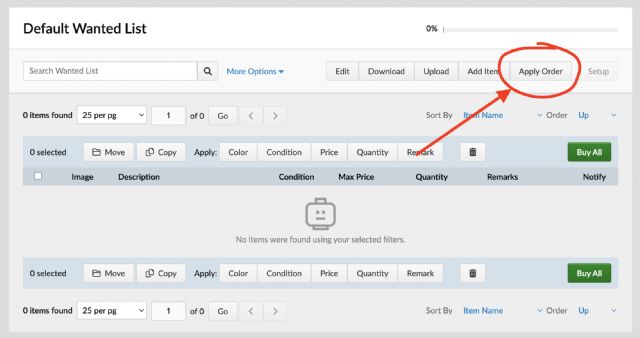
At the top of every wanted list there is a button labeled Apply Order
that allows you to update the Have Qty with items from a recent order.

If you have multiple wanted lists, it helps to combine them into one before using.

The Easy Buy/Buy All algorithms and Auto-Fill Min will take the Have Qty into
account when shopping for a wanted list.

Hope that helps.
 
 Author: daxio View Messages Posted By daxio
 Posted: Feb 14, 2024 12:58
 Subject: Re: How remove purchases from want lists ?
 Viewed: 46 times
 Topic: Buying
 Report:
Cancel Message
Cancel
Reply to Message
Reply
BrickLink
ID Card

daxio (105)

Location:  France, Nouvelle-Aquitaine
Member Since Contact Type Status
Oct 8, 2012 Contact Member Seller
Buying Privileges - OKSelling Privileges - OK
Store Closed Store: BRX
In Buying, wildchicken13 writes:
  In Buying, daxio writes:
  After 2 large orders for items on my want lists they are still saying 0% complete
?

Is there a way to force update them so I do not order duplicates in the next
orders?

Or does that only work if you use easy buy?

thanks


Dax

At the top of every wanted list there is a button labeled Apply Order
that allows you to update the Have Qty with items from a recent order.

If you have multiple wanted lists, it helps to combine them into one before using.

The Easy Buy/Buy All algorithms and Auto-Fill Min will take the Have Qty into
account when shopping for a wanted list.

Hope that helps.


Ah yes that is it didn't see that .. I need to see how that works now with
multiple orders and multiple want lists - as you say combining the want lists
will be necessary as I presume Apply Order does not keep track if it has already
been used to update a list

thanks
 Author: daxio View Messages Posted By daxio
 Posted: Feb 15, 2024 04:50
 Subject: Re: How remove purchases from want lists ?
 Viewed: 44 times
 Topic: Buying
 Report:
Cancel Message
Cancel
Reply to Message
Reply
BrickLink
ID Card

daxio (105)

Location:  France, Nouvelle-Aquitaine
Member Since Contact Type Status
Oct 8, 2012 Contact Member Seller
Buying Privileges - OKSelling Privileges - OK
Store Closed Store: BRX
In Buying, daxio writes:
  In Buying, wildchicken13 writes:
  In Buying, daxio writes:
  After 2 large orders for items on my want lists they are still saying 0% complete
?

Is there a way to force update them so I do not order duplicates in the next
orders?

Or does that only work if you use easy buy?

thanks


Dax

At the top of every wanted list there is a button labeled Apply Order
that allows you to update the Have Qty with items from a recent order.

If you have multiple wanted lists, it helps to combine them into one before using.

The Easy Buy/Buy All algorithms and Auto-Fill Min will take the Have Qty into
account when shopping for a wanted list.

Hope that helps.


Ah yes that is it didn't see that .. I need to see how that works now with
multiple orders and multiple want lists - as you say combining the want lists
will be necessary as I presume Apply Order does not keep track if it has already
been used to update a list

thanks

I cannot find a way to combine want lists that have duplicate parts - there is.a
post on here suggesting uploading list B as XML and adding to list A but I get
errors for all the dupes when I try that
 Author: wildchicken13 View Messages Posted By wildchicken13
 Posted: Feb 16, 2024 01:27
 Subject: Re: How remove purchases from want lists ?
 Viewed: 60 times
 Topic: Buying
 Report:
Cancel Message
Cancel
Reply to Message
Reply
BrickLink
ID Card

wildchicken13 (893)

Location:  USA, Illinois
Member Since Contact Type Status
Aug 11, 2014 Contact Member Seller
Buying Privileges - OKSelling Privileges - OK
Store: Wild Chicken
In Buying, daxio writes:
  I cannot find a way to combine want lists that have duplicate parts - there is.a
post on here suggesting uploading list B as XML and adding to list A but I get
errors for all the dupes when I try that

Yeah, it's a technical limitation of BrickLink. I can't understand why
you cannot simply copy the contents of one wanted list over to another, adding
quantities for duplicate items. But I guess that would require reprogramming
the logic behind this feature.

What you may need is BrickStore: https://www.brickstore.dev/

That should allow you to import all of your wanted lists, combine them into one,
and then export the combined list back to BrickLink.

While you're at it, you may be able to apply the orders to the combined wanted
list within BrickStore as well.
 Author: flyingo330 View Messages Posted By flyingo330
 Posted: Feb 16, 2024 14:55
 Subject: Re: How remove purchases from want lists ?
 Viewed: 40 times
 Topic: Buying
 Report:
Cancel Message
Cancel
Reply to Message
Reply
BrickLink
ID Card

flyingo330 (276)

Location:  Belgium
Member Since Contact Type Status
Jun 29, 2012 Contact Member Buyer
Buying Privileges - OK
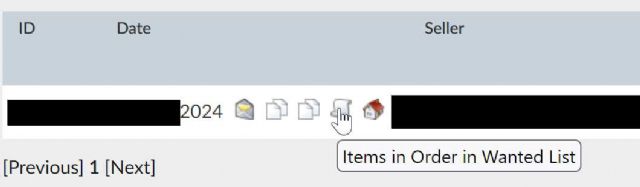
You can also go on your order page and click on the 4th icon right of your order
number, "Items in Order in Wanted List" and no need to combine your wanted
lists, but you will need to manually adjust the quantities.