find it in the Bricklink catalog. Then look at what
sets it was used in and the date ranges for those sets.
For example...
Nice cherry picking, only in one set in that colour
Also, if the set used different variants, you won’t have the good years¹.
Also, it doesn’t work if the differences aren’t recognized by the catalogue,
like stud logos.
———
¹ Tyring joke.
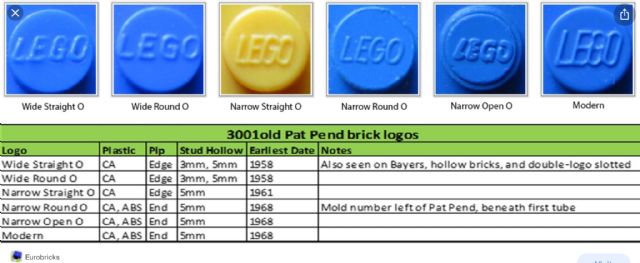
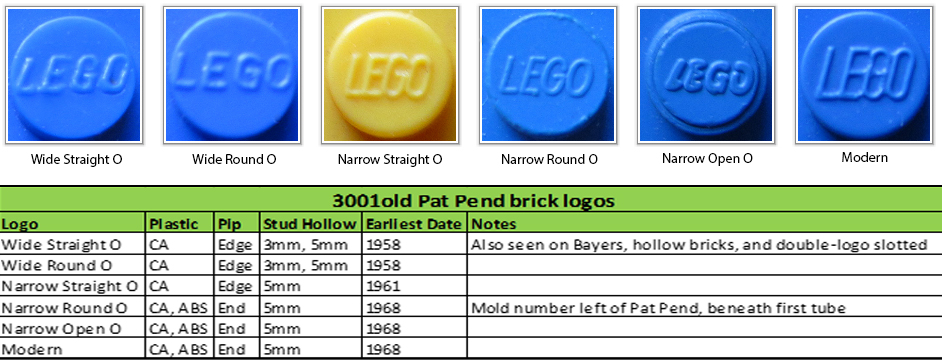
I should have probably given an example. On the CA bricks I have, there are multiple
different logos ie the O on lego is wide or narrow. Did the brick mouldings follow
the dates when the logos changed.
find it in the Bricklink catalog. Then look at what
sets it was used in and the date ranges for those sets.
For example...
Nice cherry picking, only in one set in that colour
Also, if the set used different variants, you won’t have the good years¹.
Also, it doesn’t work if the differences aren’t recognized by the catalogue,
like stud logos.
———
¹ Tyring joke.
I should have probably given an example. On the CA bricks I have, there are multiple
different logos ie the O on lego is wide or narrow. Did the brick mouldings follow
the dates when the logos changed.
find it in the Bricklink catalog. Then look at what
sets it was used in and the date ranges for those sets.
For example...
Nice cherry picking, only in one set in that colour
Also, if the set used different variants, you won’t have the good years¹.
Also, it doesn’t work if the differences aren’t recognized by the catalogue,
like stud logos.
———
¹ Tyring joke.
I should have probably given an example. On the CA bricks I have, there are multiple
different logos ie the O on lego is wide or narrow. Did the brick mouldings follow
the dates when the logos changed.


 United Kingdom


 USA, Arizona


 France, Nouvelle-Aquitaine


 Sweden