I am new to Brickstore and was wondering if anyone knows how to add the same
remark to items in bulk?
I am also wondering if there I a way to view the remaining inventory in my store
when packing orders from Brickstore? It shows everything needed to pull the order
but does not show me how many I will have remaining in the drawer after the order
is fulfilled. Maybe there is a way to sync my inventory so that this is possible
to see at a glance in the same location as the order information? Thank you
I am new to Brickstore and was wondering if anyone knows how to add the same
remark to items in bulk?
I am also wondering if there I a way to view the remaining inventory in my store
when packing orders from Brickstore? It shows everything needed to pull the order
but does not show me how many I will have remaining in the drawer after the order
is fulfilled. Maybe there is a way to sync my inventory so that this is possible
to see at a glance in the same location as the order information? Thank you
-Austin
You can select multiple rows and right-click set Remarks (make sure to be on
the remarks column).
The other functionality is not in BrickStore as far as I know. Maybe someone
can correct me.
I am new to Brickstore and was wondering if anyone knows how to add the same
remark to items in bulk?
Simply select the lots and while this type a remark.
Or right click.
I am also wondering if there I a way to view the remaining inventory in my store
when packing orders from Brickstore? It shows everything needed to pull the order
but does not show me how many I will have remaining in the drawer after the order
is fulfilled. Maybe there is a way to sync my inventory so that this is possible
to see at a glance in the same location as the order information? Thank you
Thank you for the information! I see the remarks option now.
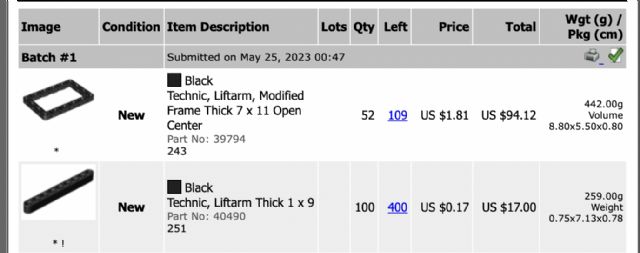
In terms of the quantity remaining I was hoping it would show how many are "Left"
such as in the image above. I have 109 left in the drawer for the first item.
Is it possible to see this at a glance somehow when the orders are uploaded?
Thank you


 USA, Michigan


 Netherlands, Overijssel


 France, Provence-Alpes-Côte d'Azur