Custom Sets: Custom sets or instructions may be listed, provided they do not
infringe on any intellectual property rights, including those of the LEGO Group.
Custom sets may not contain modified parts or non LEGO parts such as lighting
kits or electric motors.
Non LEGO Items: Certain non LEGO items that are deemed by BrickLink to be part
of LEGO fan culture may be listed. These include literature about LEGO products,
LEGO memorabilia, and items used to make custom sets (e.g., stickers, instructions,
and boxes). BrickLink reserves the right, in its sole discretion, to determine
whether a certain Non LEGO Item is appropriate for listing.
Custom Sets: Custom sets or instructions may be listed, provided they do not
infringe on any intellectual property rights, including those of the LEGO Group.
Custom sets may not contain modified parts or non LEGO parts such as lighting
kits or electric motors.
Non LEGO Items: Certain non LEGO items that are deemed by BrickLink to be part
of LEGO fan culture may be listed. These include literature about LEGO products,
LEGO memorabilia, and items used to make custom sets (e.g., stickers, instructions,
and boxes). BrickLink reserves the right, in its sole discretion, to determine
whether a certain Non LEGO Item is appropriate for listing.
Many thanks for the quick response
...is there a tutorial on how to create a custom set in bricklink?
best regards
Thomas
Yes! Add the set to your inventory as you would a normal set. Then, on the inventory
add page, check the box for "custom item" and upload a picture and enter
the description in the box labeled "comments".
Custom Sets: Custom sets or instructions may be listed, provided they do not
infringe on any intellectual property rights, including those of the LEGO Group.
Custom sets may not contain modified parts or non LEGO parts such as lighting
kits or electric motors.
Non LEGO Items: Certain non LEGO items that are deemed by BrickLink to be part
of LEGO fan culture may be listed. These include literature about LEGO products,
LEGO memorabilia, and items used to make custom sets (e.g., stickers, instructions,
and boxes). BrickLink reserves the right, in its sole discretion, to determine
whether a certain Non LEGO Item is appropriate for listing.
Also remember you cannot infringe LEGO IP, so you cannot create a "Classic
Space Rover" or "Black Falcons Castle" or anything like that.
A French joke that doesn’t work quite well in English:
Say “I’m the first man to set foot on Mars!” and point to your walking on a calendar
(Fr. mars = March).
Hmm, could work if you walk on the “chocolate” bar… but sticky… but maybe it
brings luck if you do it with you left foot.
A French joke that doesn’t work quite well in English:
Say “I’m the first man to set foot on Mars!” and point to your walking on a calendar
(Fr. mars = March).
Hmm, could work if you walk on the “chocolate” bar… but sticky… but maybe it
brings luck if you do it with you left foot.
The best way to avoid infringing anyone's IP is to hire a lawyer to check
the design names. This will of course cost money for an exhaustive search.
It's better than having to pay 10x the money to defend yourself against someone
else's IP claim.
Cheers ...
ghyde
I don't think it's necessary to hire a lawyer. BrickLink will simply
remove any listings that they deem infringe upon someone else's intellectual
property rights.


 Switzerland, Schwyz


 United Kingdom, England

 USA, Illinois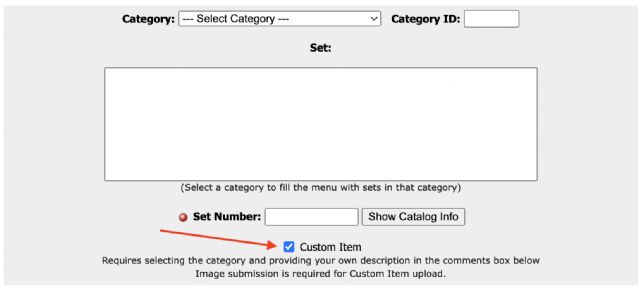
)
)

 France, Provence-Alpes-Côte d'Azur


 Australia, Queensland