Discussion Forum: Thread 338916

 Author: BondBricks View Messages Posted By BondBricks
 Posted: Apr 29, 2023 15:03
 Subject: Find Wanted Parts in a specific Store
 Viewed: 51 times
 Topic: Help
 Report:
Cancel Message
Cancel
Reply to Message
Reply
BrickLink
ID Card

BondBricks (42)

Location:  Canada, Quebec
Member Since Contact Type Status
Jan 28, 2023 Contact Member Seller
Buying Privileges - OKSelling Privileges - Revoked
Store Closed Store: BondBricks
After selecting a wanted list and clicking buy, then choosing one or more stores;
is there a way to display only items from my wanted list that are in those stores?
Right now it seems you need to scroll through all parts in the store to see
the parts on your wanted list that the store has.
 Author: peregrinator View Messages Posted By peregrinator
 Posted: Apr 29, 2023 15:11
 Subject: Re: Find Wanted Parts in a specific Store
 Viewed: 38 times
 Topic: Help
 Report:
Cancel Message
Cancel
Reply to Message
Reply
BrickLink
ID Card

peregrinator (1094)

Location:  USA, New Jersey
Member Since Contact Type Status
Jan 21, 2003 Contact Member Seller
Buying Privileges - OKSelling Privileges - OK
Store: Faber Family Bricks
In Help, BondBricks writes:
  After selecting a wanted list and clicking buy, then choosing one or more stores;
is there a way to display only items from my wanted list that are in those stores?
Right now it seems you need to scroll through all parts in the store to see
the parts on your wanted list that the store has.

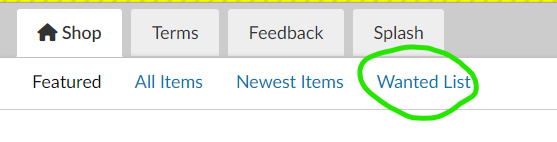
Go to the "Shop" tab in that store and click on "Wanted List"
 
 Author: BondBricks View Messages Posted By BondBricks
 Posted: Apr 29, 2023 15:46
 Subject: Re: Find Wanted Parts in a specific Store
 Viewed: 33 times
 Topic: Help
 Report:
Cancel Message
Cancel
Reply to Message
Reply
BrickLink
ID Card

BondBricks (42)

Location:  Canada, Quebec
Member Since Contact Type Status
Jan 28, 2023 Contact Member Seller
Buying Privileges - OKSelling Privileges - Revoked
Store Closed Store: BondBricks
Can't believe I missed that.... thank you for the quick answer

In Help, peregrinator writes:
  In Help, BondBricks writes:
  After selecting a wanted list and clicking buy, then choosing one or more stores;
is there a way to display only items from my wanted list that are in those stores?
Right now it seems you need to scroll through all parts in the store to see
the parts on your wanted list that the store has.

Go to the "Shop" tab in that store and click on "Wanted List"