When selecting a shop for buying bricks from my whishlist, the next step is a
pop up "confirm store selection" to check the bricks I am about to buy.
Now, how can I easily see the remark that some sellers have on their product?
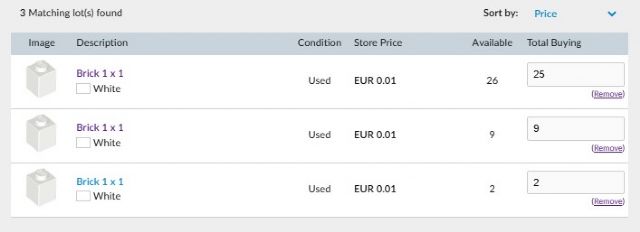
Please see screenshot as an example: same product, same price, but definately
not same quality: pressing on each product will show the remark e.g. 'heavily
yellowed' 'as new' or also possible empty because no remark was given.
In the case of a remark that was added by the seller, how can I see that remark
UPFRONT? The screenshot is a tiny example, imagine if you have a WL of 50+ items?
Do you actually need to click on each item and with that go to the shop's
product page?
Am very curious to how buying yellowed bricks can be prevented in these cases.
When selecting a shop for buying bricks from my whishlist, the next step is a
pop up "confirm store selection" to check the bricks I am about to buy.
Now, how can I easily see the remark that some sellers have on their product?
Please see screenshot as an example: same product, same price, but definately
not same quality: pressing on each product will show the remark e.g. 'heavily
yellowed' 'as new' or also possible empty because no remark was given.
In the case of a remark that was added by the seller, how can I see that remark
UPFRONT? The screenshot is a tiny example, imagine if you have a WL of 50+ items?
Do you actually need to click on each item and with that go to the shop's
product page?
Am very curious to how buying yellowed bricks can be prevented in these cases.
Do you actually need to click on each item and with that go to the shop's
product page?
You could also create the cart(s) and click through to the store to see all the
items from that store in one page, but in general, yes, you do need to do that
to avoid the scenario you're describing.
Even if all the bricks are labeled as great quality, what if you ending up buying
from a store that has multiple negative reviews from the past week saying their
order was mailed with 50% non-Lego, but you didn't click through to that
store to see their feedback? And anyway, you aren't actually guaranteed the
best prices through the wanted list Buy buttons (partly because outside of very
specific lowest-common-denominator scenarios, determining the true "best"
price for your particular order is somewhat impossible). Plus you might want
to buy additional parts that you Somewhat Want from a seller after picking them
because they sell parts you Really Want, and that throws all the Wanted List
algorithm stuff right out the window.
In the end, this isn't very different from buying something on eBay without
clicking into the item to read its full description and checking the seller's
recent feedback. It's just something that comes with buying from third parties
online to help ensure you actually buy what you want.
Thanks for your reply trainphreak.
I followed your instructions in your first sentence and now, only after 147 (
) Bricklink transactions, I see that on the shop-cart page the sellers'
comments are visible. No idea how I missed that all previous transactions.....
On the good side it might show that 146 experiences were 'on or above expectation'.
Kind regards and again thanks for pointing this out.
In Buying, trainphreak writes:
In Buying, mzmzmz writes:
Do you actually need to click on each item and with that go to the shop's
product page?
You could also create the cart(s) and click through to the store to see all the
items from that store in one page, but in general, yes, you do need to do that
to avoid the scenario you're describing.
Even if all the bricks are labeled as great quality, what if you ending up buying
from a store that has multiple negative reviews from the past week saying their
order was mailed with 50% non-Lego, but you didn't click through to that
store to see their feedback? And anyway, you aren't actually guaranteed the
best prices through the wanted list Buy buttons (partly because outside of very
specific lowest-common-denominator scenarios, determining the true "best"
price for your particular order is somewhat impossible). Plus you might want
to buy additional parts that you Somewhat Want from a seller after picking them
because they sell parts you Really Want, and that throws all the Wanted List
algorithm stuff right out the window.
In the end, this isn't very different from buying something on eBay without
clicking into the item to read its full description and checking the seller's
recent feedback. It's just something that comes with buying from third parties
online to help ensure you actually buy what you want.


 Netherlands, Utrecht


 USA, Pennsylvania
 ) Bricklink transactions, I see that on the shop-cart page the sellers'