What It Does:
1. Real LEGO colors with perceptual matching (Delta-E CIE2000, not basic RGB).
2. One-click exports to BrickLink XML or Rebrickable CSV or PDF building guide.
3. Works with official sets (31197, 31198, 31202, etc.) or all standard colors.
4. Interactive editing: pin tiles, swap colors, preview changes.
It is hosted on free Hugging Face CPU, so it can be slow. For faster processing,
install locally: pip install legopic
I vibe-coded it over the weekend. Figured others might want it too.
I’m a pretty light LEGO user myself and didn’t even know this existed. I imagine
there are others who also just want something quick and dirty instead of installing
a full app. And since it’s open source, it’s more of a fun side project anyway.
What It Does:
1. Real LEGO colors with perceptual matching (Delta-E CIE2000, not basic RGB).
2. One-click exports to BrickLink XML or Rebrickable CSV or PDF building guide.
3. Works with official sets (31197, 31198, 31202, etc.) or all standard colors.
4. Interactive editing: pin tiles, swap colors, preview changes.
It is hosted on free Hugging Face CPU, so it can be slow. For faster processing,
install locally: pip install legopic
I vibe-coded it over the weekend. Figured others might want it too.
Feel free to comment here or open a GitHub issue!
Besides that this feature already exists in Bricklink Studio, I could be more
enthusiastic if your approach would solve the two main shortcoming of most mosaic
programs I have seen:
(1) it should use error diffusion techniques, such as Floyd-Steinberg dithering.
For photo realistic images, this is very relevant to get nice looking results.
(2) it should not reduce the palette before it starts looking for available bricks.
For dithered images, you'd end up with mostly 1x1 tiles; for gradients, you'd
end up with color bands.
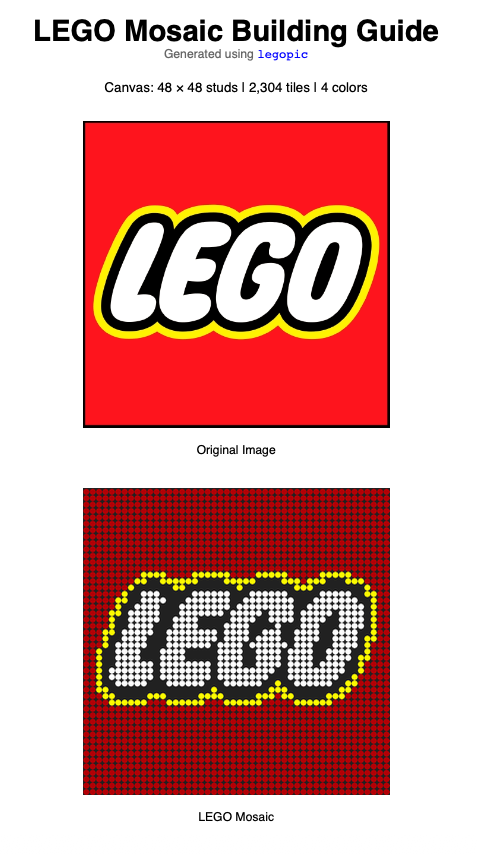
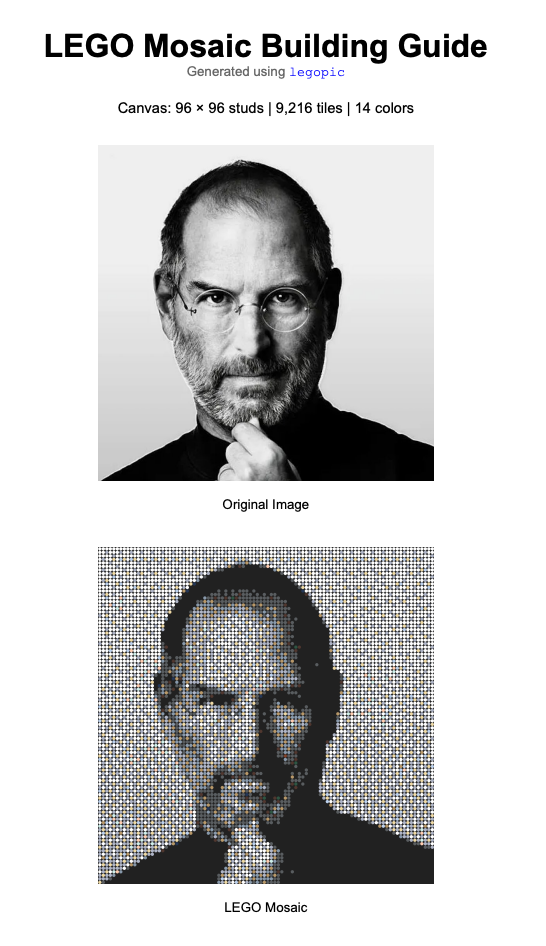
Judging from your sample outputs (especially from the portrait), your vibe coded
app does neither of the above.
If you don't want to end up with mostly 1x1 tiles, you'd have to combine
your color reduction (*), your error diffusion (**), and your available parts
logic (***) into one loop. If you can do that, you may have found yourself a
fan.
*) Color reduction is how you get from RGB or similar to your LEGO-color palette
index.
**) Error diffusion is if you placed a red tile in pixel one, but really needed
something a bit more orange ("the bit more" is what we call "the
error" that would trigger pixel two to lean more towards orange, which may
result in the second tile becoming orange, more so than that pixel actually needed,
and so on. Part of the 'error' is propagated to the cell to the right,
but also some to the cells below, to minimize 'color bleeding'. These
algorithms are well known and used in image processing software that handles
the color reduction to palette colors.
***) Available parts logic could handle just knowing about which LEGO shapes
exist, or could be more advanced like knowing about the pricing or which parts
you already have available. Ideally, the weighing algorithm that handles the
color reduction process, should have room for a weight that relates to this pricing/availability.
As a bonus, one could think of incorporating parts with a different texture,
like the grill tiles, masonry bricks or studded/non-studded, and thus not only
mapping the best matching color, but the best matching overall appearance for
that cell.
What It Does:
1. Real LEGO colors with perceptual matching (Delta-E CIE2000, not basic RGB).
2. One-click exports to BrickLink XML or Rebrickable CSV or PDF building guide.
3. Works with official sets (31197, 31198, 31202, etc.) or all standard colors.
4. Interactive editing: pin tiles, swap colors, preview changes.
It is hosted on free Hugging Face CPU, so it can be slow. For faster processing,
install locally: pip install legopic
I vibe-coded it over the weekend. Figured others might want it too.
Feel free to comment here or open a GitHub issue!
Besides that this feature already exists in Bricklink Studio, I could be more
enthusiastic if your approach would solve the two main shortcoming of most mosaic
programs I have seen:
(1) it should use error diffusion techniques, such as Floyd-Steinberg dithering.
For photo realistic images, this is very relevant to get nice looking results.
(2) it should not reduce the palette before it starts looking for available bricks.
For dithered images, you'd end up with mostly 1x1 tiles; for gradients, you'd
end up with color bands.
Judging from your sample outputs (especially from the portrait), your vibe coded
app does neither of the above.
If you don't want to end up with mostly 1x1 tiles, you'd have to combine
your color reduction (*), your error diffusion (**), and your available parts
logic (***) into one loop. If you can do that, you may have found yourself a
fan.
*) Color reduction is how you get from RGB or similar to your LEGO-color palette
index.
**) Error diffusion is if you placed a red tile in pixel one, but really needed
something a bit more orange ("the bit more" is what we call "the
error" that would trigger pixel two to lean more towards orange, which may
result in the second tile becoming orange, more so than that pixel actually needed,
and so on. Part of the 'error' is propagated to the cell to the right,
but also some to the cells below, to minimize 'color bleeding'. These
algorithms are well known and used in image processing software that handles
the color reduction to palette colors.
***) Available parts logic could handle just knowing about which LEGO shapes
exist, or could be more advanced like knowing about the pricing or which parts
you already have available. Ideally, the weighing algorithm that handles the
color reduction process, should have room for a weight that relates to this pricing/availability.
As a bonus, one could think of incorporating parts with a different texture,
like the grill tiles, masonry bricks or studded/non-studded, and thus not only
mapping the best matching color, but the best matching overall appearance for
that cell.
Thank you for the detailed and constructive feedback.
Regarding points (1) and (2): These concerns have been addressed in v0.5. The
package now implements Floyd-Steinberg dithering along with five additional error
diffusion algorithms (Atkinson, Jarvis-Judice-Ninke, Stucki, Sierra, and Bayer).
Importantly, the dithering step operates directly on the full LEGO color palette
during error propagation — there is no pre-reduction step that would cause the
banding artifacts you described. The API provides three predefined profiles (classic,
sharp, dithered) for common use cases, while also allowing users to compose custom
pipelines with fine-grained control over pooling methods, color spaces, dithering
algorithms, scan order, and error diffusion strength. Ideally, an intelligent
algorithm would adaptively compose the workflow based on information loss metrics
— I would welcome anyone who wishes to build on top of this foundation.
Regarding point (3) — inventory/pricing-aware optimization: Integrating real-time
market data into the color selection loop would require connecting to marketplace
APIs (BrickLink, BrickOwl, etc.) and substantially increase algorithmic complexity.
The optimization would become O(image size × canvas size × palette size × inventory
tiers), which falls into the class of mixed-integer linear programming (MILP)
problems. For non-trivial canvas sizes, this would require commercial solvers
(e.g., Gurobi, CPLEX) whose licensing costs exceed the budget of this hobby project.
The current implementation uses a greedy heuristic that does not guarantee global
optimality but performs reasonably well in practice. The guiding principle of
legopic is to remain lean and educational, so I opted to keep the scope focused
rather than introduce heavy dependencies.
That said, I would welcome community contributions from anyone who wishes to
explore inventory-weighted dithering or approximate algorithms for this problem.
My background is in applied math, machine learning (though not specialized in
CV), and backend development — feel free to open a PR directly on the backend
package (https://github.com/zl3311/lego_image_converter). The frontend is outside
my wheelhouse and was admittedly vibe-coded, so take it with a grain of salt
if things get funky.
Again, thank you for the thoughtful peer review. Dithered Steve Jobs does indeed
look better!
What It Does:
1. Real LEGO colors with perceptual matching (Delta-E CIE2000, not basic RGB).
2. One-click exports to BrickLink XML or Rebrickable CSV or PDF building guide.
3. Works with official sets (31197, 31198, 31202, etc.) or all standard colors.
4. Interactive editing: pin tiles, swap colors, preview changes.
It is hosted on free Hugging Face CPU, so it can be slow. For faster processing,
install locally: pip install legopic
I vibe-coded it over the weekend. Figured others might want it too.
Feel free to comment here or open a GitHub issue!
I strongly, strongly recommend you change your project name and remove the word
"lego" from it, before you hear from LEGO's lawyers.
What It Does:
1. Real LEGO colors with perceptual matching (Delta-E CIE2000, not basic RGB).
2. One-click exports to BrickLink XML or Rebrickable CSV or PDF building guide.
3. Works with official sets (31197, 31198, 31202, etc.) or all standard colors.
4. Interactive editing: pin tiles, swap colors, preview changes.
It is hosted on free Hugging Face CPU, so it can be slow. For faster processing,
install locally: pip install legopic
I vibe-coded it over the weekend. Figured others might want it too.
Feel free to comment here or open a GitHub issue!
I strongly, strongly recommend you change your project name and remove the word
"lego" from it, before you hear from LEGO's lawyers.
You are absolutely right. They seem to be just as famous for protecting
their IP as Disney, if not more so. I've removed all mentions of “LEGO.”
Thanks for the advice!
Also, to the admin: if you ever receive a takedown request regarding the images
or anything else in the future, please feel free to take action without needing
my permission. (you possibly do not need my permission anyway )


 USA, California

)
)
)


 United Kingdom, England
 Netherlands, Groningen
 that would trigger pixel two to lean more towards orange, which may
 )
)