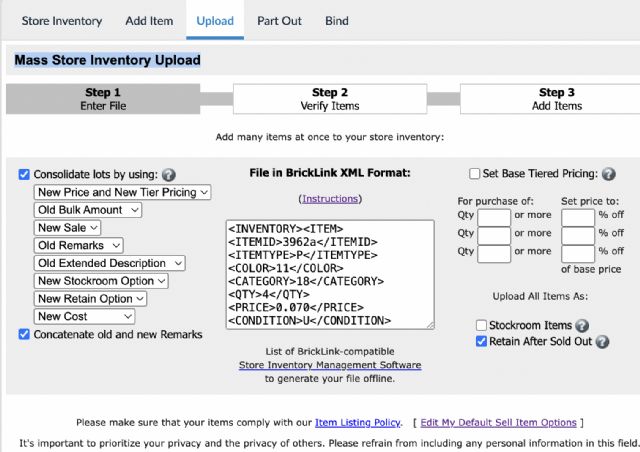
Hoping someone technical can assist me with adding the (part number) to my mass
uploads. I have attached to images which might help. The first one is the page
where you import the upload file and the 2nd is the output from that file. Its
the page in the 2nd image where I would like to see the part number but I am
struggling to work out how to add the part number tag it to the upload 😩. Any
help would be appreciated!
Hoping someone technical can assist me with adding the (part number) to my mass
uploads. I have attached to images which might help. The first one is the page
where you import the upload file and the 2nd is the output from that file. Its
the page in the 2nd image where I would like to see the part number but I am
struggling to work out how to add the part number tag it to the upload 😩. Any
help would be appreciated!
It doesn't show the part number, like for items in the Cart.
Simply ignore.
If you correctly set the consolidation settings, and are using BrickStore to
upload, you're safe, you don't need this page 2 in fact. Just a glance
and upload.
@1001bricks - Thanks for your reply. I understand what you are saying but I
would like the part number to populate as I need it for my own purposes, as I
am intending on printing the uploads to assist in putting the parts away. Do
you know if it is even possible to add it?
@1001bricks - Thanks for your reply. I understand what you are saying but I
would like the part number to populate as I need it for my own purposes, as I
am intending on printing the uploads to assist in putting the parts away. Do
you know if it is even possible to add it?
If you need the part number to be shown on places where it does not normally
show, you will have to add it to your Remarks field.
@ hpoort - Thanks for this. My reasoning behind this is mainly for helping with
finding homes for the pieces that do not currently have remarks (an assigned
location). I want to be able to quickly identify the part on bricklink, so I
can add a location for the new part. I hope that makes sense? I think I might
go with your suggestion though as it shouldnt add much additional time to the
process. Thanks for your help
@1001bricks - Thanks for your reply. I understand what you are saying but I
would like the part number to populate as I need it for my own purposes, as I
am intending on printing the uploads to assist in putting the parts away.
If you use BrickStore then you don't have to print (+ save ressources).
You make any upload a file that you save like in specific folder of your PC .../BL
uploads then "20250830 set 8880 and misc" for example.
This way you keep a track of everything you did and can compare later...


 United Kingdom, England

)
)

 France, Provence-Alpes-Côte d'Azur
 Netherlands, Groningen