or the Edit Order page before you send your invoice. That page is accessible
for each order via a link a the bottom or the Order Detail page.
If you are selling sets, I would advise working any handling charges into the
cost of your item. No one likes paying fees. (It's more common to have a
small fee for parts sellers as those items tend to be lower in value.) Some sellers
include packaging costs by padding their shipping charges beyond actual postage
costs. This is okay, but be sure to disclose this in your store terms.
You can save your buyers money by using Paypals integrated shipping or Pirateship.com
to pay only commercial shipping rates and printing your labels at home.
Add them to what you charge for shipping. Although often used interchangeably,
shipping is not the same as postage cost. Shipping is for postage + costs such
as envelopes and supplies.
In Shipping, twerden writes:
How do I add misc fees for shipping, such as shipping envelopes or other supplies
i have to buy in order to ship an order? Thanks for the help.
Add them to what you charge for shipping. Although often used interchangeably,
shipping is not the same as postage cost. Shipping is for postage + costs such
as envelopes and supplies.
In Shipping, twerden writes:
How do I add misc fees for shipping, such as shipping envelopes or other supplies
i have to buy in order to ship an order? Thanks for the help.
Thank you all very kindly for your help and advice. I get the point but I don't
see where I specify the cost of shipping or how/when to send an invoice. The
one sale I made got invoiced automatically and I don't know where/how the
shipping cost was calculated.
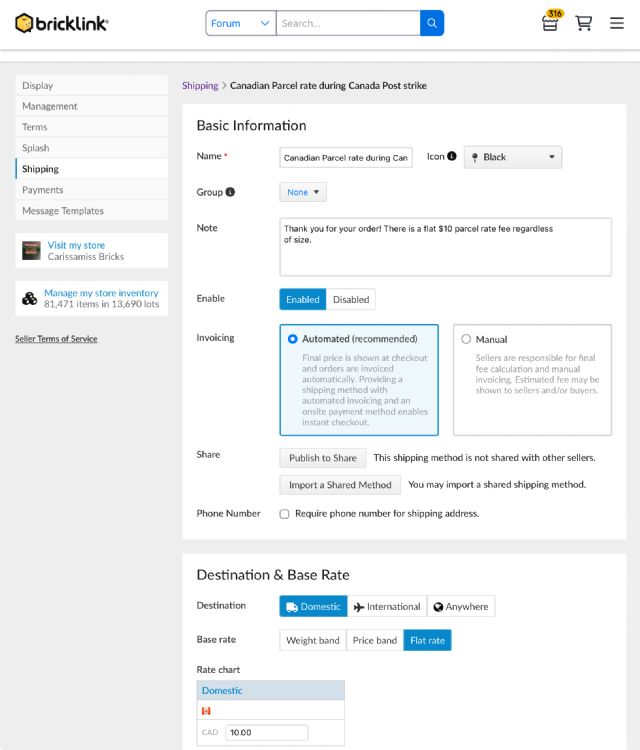
Right now you have your shipping as instant checkout, so the process is automated
and the buyer pays at the time of checkout. If this isn’t what you want, and
you want to control the shipping cost for each individual order, under “store
settings” then “shipping”, choose your shipping method and change it to manual
(see my photo). Then on the “store orders” page, you will fill out the column
for shipping, and additional column for supplies charges if that’s how you want
to run your shop, “save changes” and then click on the little invoice to send
it along. That’s manual invoicing in a nutshell.
Pros: you can tailor the shipping cost for each order. Cons: buyers prefer instant
checkout, and you may end up with more NPBs (non-paying buyers).
If you want instant checkout but you want the shipping rates to vary based on
weight, or price or whatever, keep it as instant checkout “enabled” (so shipping
= automated) but then spend some time exploring the parameters you can modify.
You can charge a flat rate, or a fluctuating rate by price, by weight or size.
You can tell Bricklink to default to manual invoice for large items like sets,
but allow instant checkout for smaller items like parts or minifigures.
In Shipping, twerden writes:
Thank you all very kindly for your help and advice. I get the point but I don't
see where I specify the cost of shipping or how/when to send an invoice. The
one sale I made got invoiced automatically and I don't know where/how the
shipping cost was calculated.


 USA, Connecticut


 Canada, Ontario