Discussion Forum: Thread 370051

 Author: chriswally View Messages Posted By chriswally
 Posted: May 26, 2025 17:04
 Subject: Unsure my store shipping methods are correct
 Viewed: 68 times
 Topic: Selling
 Report:
Cancel Message
Cancel
Reply to Message
Reply
BrickLink
ID Card

chriswally (220)

Location:  Canada, British Columbia
Member Since Contact Type Status
Jun 21, 2016 Contact Member Seller
Buying Privileges - OKSelling Privileges - OK
Store: BrickWally
I've had my store open for several months, mainly selling used vintage sets.
I am based in Canada and I've had several sales both domestic and international,
but I constantly get messages from users saying they are having issues at check-out
and when requesting invoices ie. "Error, Shipping Restriction Not Met.".

I have no lot or price limits set on anything.

I thought I had it setup properly with two shipping methods: Domestic and International,
both with manual invoicing as I prefer to check the size/weight of each package
and destination to send an accurate shipping cost. Both of these were added via
"shared shipping methods" option, so I am wondering if that is causing
these error messages for users?

Wondering if anybody could help me troubleshoot this? I've been in contact
with BL support in the past for this issue, but seem to go in circles with getting
the shipping methods setup correctly.
 
 Author: Nubs_Select View Messages Posted By Nubs_Select
 Posted: May 26, 2025 17:13
 Subject: Re: Unsure my store shipping methods are correct
 Viewed: 36 times
 Topic: Selling
 Report:
Cancel Message
Cancel
Reply to Message
Reply
BrickLink
ID Card

Nubs_Select (4750)

Location:  Canada, Ontario
Member Since Contact Type Status
Mar 15, 2016 Contact Member Seller
Buying Privileges - OKSelling Privileges - OK
Store: Nub's Select
In Selling, chriswally writes:
  I've had my store open for several months, mainly selling used vintage sets.
I am based in Canada and I've had several sales both domestic and international,
but I constantly get messages from users saying they are having issues at check-out
and when requesting invoices ie. "Error, Shipping Restriction Not Met.".

I have no lot or price limits set on anything.

I thought I had it setup properly with two shipping methods: Domestic and International,
both with manual invoicing as I prefer to check the size/weight of each package
and destination to send an accurate shipping cost. Both of these were added via
"shared shipping methods" option, so I am wondering if that is causing
these error messages for users?

Wondering if anybody could help me troubleshoot this? I've been in contact
with BL support in the past for this issue, but seem to go in circles with getting
the shipping methods setup correctly.

on this

https://www.bricklink.com/v2/mystore/management.page

page do you have

"Backup for Instant Checkout"

enabled?
 Author: chriswally View Messages Posted By chriswally
 Posted: May 26, 2025 17:44
 Subject: Re: Unsure my store shipping methods are correct
 Viewed: 26 times
 Topic: Selling
 Report:
Cancel Message
Cancel
Reply to Message
Reply
BrickLink
ID Card

chriswally (220)

Location:  Canada, British Columbia
Member Since Contact Type Status
Jun 21, 2016 Contact Member Seller
Buying Privileges - OKSelling Privileges - OK
Store: BrickWally
In Selling, Nubs_Select writes:
  on this

https://www.bricklink.com/v2/mystore/management.page

page do you have

"Backup for Instant Checkout"

enabled?

No it is greyed out for me, with "You must have at least one Instant Checkout
shipping method available to enable this option.
"

Do I need to add a third shipping method with automated invoicing, enable "Backup
for Instant Checkout", and then disable the third shipping method??
 Author: Nubs_Select View Messages Posted By Nubs_Select
 Posted: May 26, 2025 17:57
 Subject: Re: Unsure my store shipping methods are correct
 Viewed: 28 times
 Topic: Selling
 Report:
Cancel Message
Cancel
Reply to Message
Reply
BrickLink
ID Card

Nubs_Select (4750)

Location:  Canada, Ontario
Member Since Contact Type Status
Mar 15, 2016 Contact Member Seller
Buying Privileges - OKSelling Privileges - OK
Store: Nub's Select
In Selling, chriswally writes:
  In Selling, Nubs_Select writes:
  on this

https://www.bricklink.com/v2/mystore/management.page

page do you have

"Backup for Instant Checkout"

enabled?

No it is greyed out for me, with "You must have at least one Instant Checkout
shipping method available to enable this option.
"

Do I need to add a third shipping method with automated invoicing, enable "Backup
for Instant Checkout", and then disable the third shipping method??

please post an image of your shipping methods specifics
 Author: chriswally View Messages Posted By chriswally
 Posted: May 26, 2025 19:53
 Subject: Re: Unsure my store shipping methods are correct
 Viewed: 39 times
 Topic: Selling
 Report:
Cancel Message
Cancel
Reply to Message
Reply
BrickLink
ID Card

chriswally (220)

Location:  Canada, British Columbia
Member Since Contact Type Status
Jun 21, 2016 Contact Member Seller
Buying Privileges - OKSelling Privileges - OK
Store: BrickWally
In Selling, Nubs_Select writes:
  In Selling, chriswally writes:
  In Selling, Nubs_Select writes:
  on this

https://www.bricklink.com/v2/mystore/management.page

page do you have

"Backup for Instant Checkout"

enabled?

No it is greyed out for me, with "You must have at least one Instant Checkout
shipping method available to enable this option.
"

Do I need to add a third shipping method with automated invoicing, enable "Backup
for Instant Checkout", and then disable the third shipping method??

please post an image of your shipping methods specifics

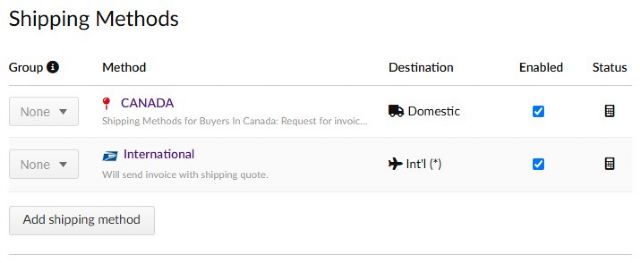
Here they are - Domestic and International. As I mentioned, I used the Shared
Shipping Method
option and chose the ones at the top of the list.


 Author: Nubs_Select View Messages Posted By Nubs_Select
 Posted: May 26, 2025 20:00
 Subject: Re: Unsure my store shipping methods are correct
 Viewed: 42 times
 Topic: Selling
 Report:
Cancel Message
Cancel
Reply to Message
Reply
BrickLink
ID Card

Nubs_Select (4750)

Location:  Canada, Ontario
Member Since Contact Type Status
Mar 15, 2016 Contact Member Seller
Buying Privileges - OKSelling Privileges - OK
Store: Nub's Select
In Selling, chriswally writes:
  In Selling, Nubs_Select writes:
  In Selling, chriswally writes:
  In Selling, Nubs_Select writes:
  on this

https://www.bricklink.com/v2/mystore/management.page

page do you have

"Backup for Instant Checkout"

enabled?

No it is greyed out for me, with "You must have at least one Instant Checkout
shipping method available to enable this option.
"

Do I need to add a third shipping method with automated invoicing, enable "Backup
for Instant Checkout", and then disable the third shipping method??

please post an image of your shipping methods specifics

Here they are - Domestic and International. As I mentioned, I used the Shared
Shipping Method
option and chose the ones at the top of the list.

please post images of the "Restrictions and Adjustments" sections of
both aswell
 Author: chriswally View Messages Posted By chriswally
 Posted: May 26, 2025 23:17
 Subject: Re: Unsure my store shipping methods are correct
 Viewed: 38 times
 Topic: Selling
 Report:
Cancel Message
Cancel
Reply to Message
Reply
BrickLink
ID Card

chriswally (220)

Location:  Canada, British Columbia
Member Since Contact Type Status
Jun 21, 2016 Contact Member Seller
Buying Privileges - OKSelling Privileges - OK
Store: BrickWally
In Selling, Nubs_Select writes:
  In Selling, chriswally writes:
  In Selling, Nubs_Select writes:
  In Selling, chriswally writes:
  In Selling, Nubs_Select writes:
  on this

https://www.bricklink.com/v2/mystore/management.page

page do you have

"Backup for Instant Checkout"

enabled?

No it is greyed out for me, with "You must have at least one Instant Checkout
shipping method available to enable this option.
"

Do I need to add a third shipping method with automated invoicing, enable "Backup
for Instant Checkout", and then disable the third shipping method??

please post an image of your shipping methods specifics

Here they are - Domestic and International. As I mentioned, I used the Shared
Shipping Method
option and chose the ones at the top of the list.

please post images of the "Restrictions and Adjustments" sections of
both aswell

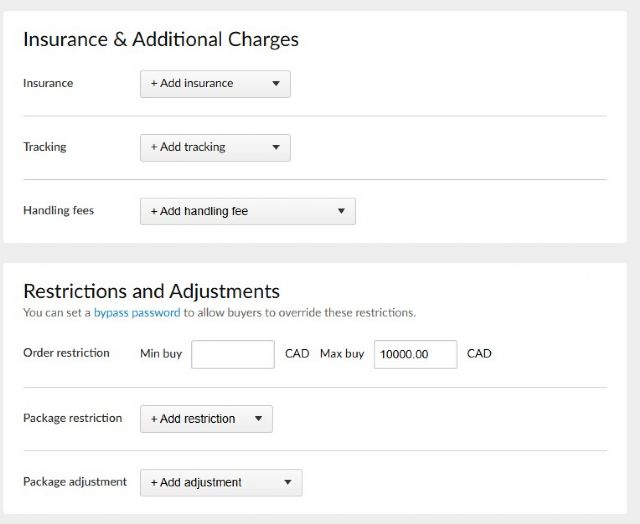
Here they are. I see now there is a MAX set on the International orders from
the shared method, but why would domestic buyers be having similar issues? I
assume I need to remove that MAX purchase number to solve the problem for international
buyers? What about enabling the "Backup for Instant Checkout" if its
greyed out?


 Author: Nubs_Select View Messages Posted By Nubs_Select
 Posted: May 26, 2025 23:49
 Subject: Re: Unsure my store shipping methods are correct
 Viewed: 41 times
 Topic: Selling
 Report:
Cancel Message
Cancel
Reply to Message
Reply
BrickLink
ID Card

Nubs_Select (4750)

Location:  Canada, Ontario
Member Since Contact Type Status
Mar 15, 2016 Contact Member Seller
Buying Privileges - OKSelling Privileges - OK
Store: Nub's Select
In Selling, chriswally writes:
  In Selling, Nubs_Select writes:
  In Selling, chriswally writes:
  In Selling, Nubs_Select writes:
  In Selling, chriswally writes:
  In Selling, Nubs_Select writes:
  on this

https://www.bricklink.com/v2/mystore/management.page

page do you have

"Backup for Instant Checkout"

enabled?

No it is greyed out for me, with "You must have at least one Instant Checkout
shipping method available to enable this option.
"

Do I need to add a third shipping method with automated invoicing, enable "Backup
for Instant Checkout", and then disable the third shipping method??

please post an image of your shipping methods specifics

Here they are - Domestic and International. As I mentioned, I used the Shared
Shipping Method
option and chose the ones at the top of the list.

please post images of the "Restrictions and Adjustments" sections of
both aswell

Here they are. I see now there is a MAX set on the International orders from
the shared method, but why would domestic buyers be having similar issues? I
assume I need to remove that MAX purchase number to solve the problem for international
buyers? What about enabling the "Backup for Instant Checkout" if its
greyed out?

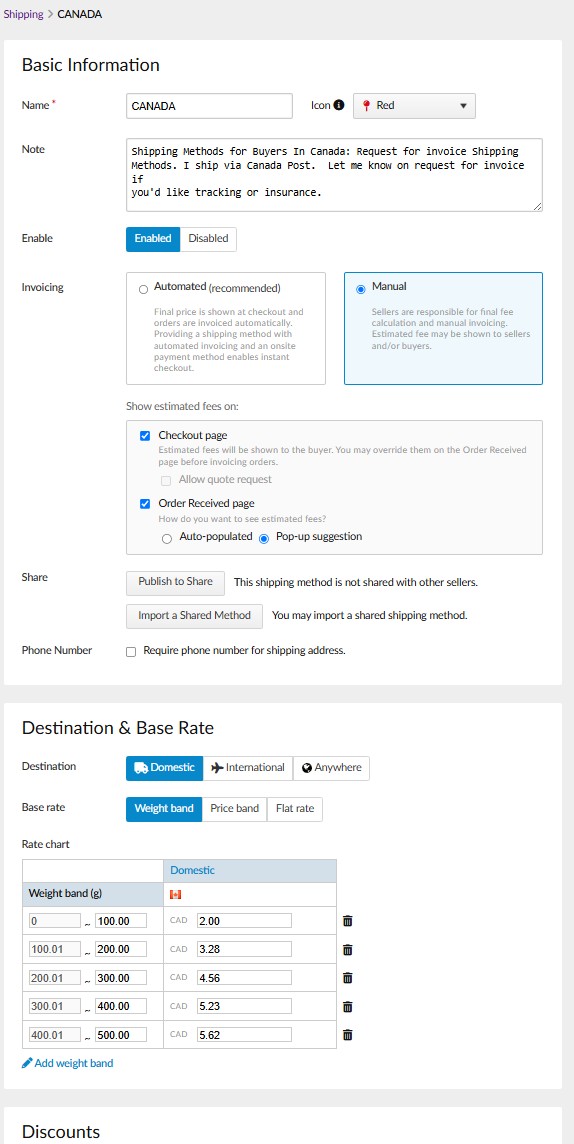
Yes, removing the $99 thing should help, as for if domestic have the problem
aswell, perhaps add another weight band with 999999999 with some flat rate parcel
costs and that might solve it.
 Author: chriswally View Messages Posted By chriswally
 Posted: May 27, 2025 09:42
 Subject: Re: Unsure my store shipping methods are correct
 Viewed: 35 times
 Topic: Selling
 Report:
Cancel Message
Cancel
Reply to Message
Reply
BrickLink
ID Card

chriswally (220)

Location:  Canada, British Columbia
Member Since Contact Type Status
Jun 21, 2016 Contact Member Seller
Buying Privileges - OKSelling Privileges - OK
Store: BrickWally
In Selling, Nubs_Select writes:
  In Selling, chriswally writes:
  In Selling, Nubs_Select writes:
  In Selling, chriswally writes:
  In Selling, Nubs_Select writes:
  In Selling, chriswally writes:
  In Selling, Nubs_Select writes:
  on this

https://www.bricklink.com/v2/mystore/management.page

page do you have

"Backup for Instant Checkout"

enabled?

No it is greyed out for me, with "You must have at least one Instant Checkout
shipping method available to enable this option.
"

Do I need to add a third shipping method with automated invoicing, enable "Backup
for Instant Checkout", and then disable the third shipping method??

please post an image of your shipping methods specifics

Here they are - Domestic and International. As I mentioned, I used the Shared
Shipping Method
option and chose the ones at the top of the list.

please post images of the "Restrictions and Adjustments" sections of
both aswell

Here they are. I see now there is a MAX set on the International orders from
the shared method, but why would domestic buyers be having similar issues? I
assume I need to remove that MAX purchase number to solve the problem for international
buyers? What about enabling the "Backup for Instant Checkout" if its
greyed out?

Yes, removing the $99 thing should help, as for if domestic have the problem
aswell, perhaps add another weight band with 999999999 with some flat rate parcel
costs and that might solve it.

Ok thanks. Or am I better off getting rid of all the weight bands on domestic,
and just adding a single price band $0-$999999999999?
 Author: Nubs_Select View Messages Posted By Nubs_Select
 Posted: May 27, 2025 13:19
 Subject: Re: Unsure my store shipping methods are correct
 Viewed: 46 times
 Topic: Selling
 Report:
Cancel Message
Cancel
Reply to Message
Reply
BrickLink
ID Card

Nubs_Select (4750)

Location:  Canada, Ontario
Member Since Contact Type Status
Mar 15, 2016 Contact Member Seller
Buying Privileges - OKSelling Privileges - OK
Store: Nub's Select
In Selling, chriswally writes:
  In Selling, Nubs_Select writes:
  In Selling, chriswally writes:
  In Selling, Nubs_Select writes:
  In Selling, chriswally writes:
  In Selling, Nubs_Select writes:
  In Selling, chriswally writes:
  In Selling, Nubs_Select writes:
  on this

https://www.bricklink.com/v2/mystore/management.page

page do you have

"Backup for Instant Checkout"

enabled?

No it is greyed out for me, with "You must have at least one Instant Checkout
shipping method available to enable this option.
"

Do I need to add a third shipping method with automated invoicing, enable "Backup
for Instant Checkout", and then disable the third shipping method??

please post an image of your shipping methods specifics

Here they are - Domestic and International. As I mentioned, I used the Shared
Shipping Method
option and chose the ones at the top of the list.

please post images of the "Restrictions and Adjustments" sections of
both aswell

Here they are. I see now there is a MAX set on the International orders from
the shared method, but why would domestic buyers be having similar issues? I
assume I need to remove that MAX purchase number to solve the problem for international
buyers? What about enabling the "Backup for Instant Checkout" if its
greyed out?

Yes, removing the $99 thing should help, as for if domestic have the problem
aswell, perhaps add another weight band with 999999999 with some flat rate parcel
costs and that might solve it.

Ok thanks. Or am I better off getting rid of all the weight bands on domestic,
and just adding a single price band $0-$999999999999?

That could work, tho having multiple weight bands prior can better show the customer
the shipping estimate with 1 larger band at the end for everything else, otherwise
it might estimate shipping as the highest price point which could turn customers
away