I’m having trouble connecting my paypal to my store. It says successfully connected
whenever I input my details, but is not connected when I return to bricklink.
I cannot purchase from my shop looking at it from a different account. I messaged
customer support asking about this issue and they responded within 3 days asking
for some additional bricklink account information. I have not heard back in over
a week. Is this normal or is there something else I need to be doing? Is there
another way to get in contact with someone who could help?
I’m having trouble connecting my paypal to my store. It says successfully connected
whenever I input my details, but is not connected when I return to bricklink.
You've both to "connect" from BrickLink and authorize this connection
from PayPal - (iirc as I did this 10 years ago)... Did you do both?
You can post screen copies but blurr or remove any number/detail.
I’m having trouble connecting my paypal to my store. It says successfully connected
whenever I input my details, but is not connected when I return to bricklink.
You've both to "connect" from BrickLink and authorize this connection
from PayPal - (iirc as I did this 10 years ago)... Did you do both?
You can post screen copies but blurr or remove any number/detail.
Thank you for the response. I double checked to make sure Bricklink had paypal
permissions and they do. I’ll post screenshots to see if it’s any help. First
screenshot of successful connection after clicking “connect my paypal.” Second
screenshot of the paypal still being disconnected after the successful connection.
Third image is of my granted paypal permissions. I’ve tried more than 1 paypal
account on both pc and mobile. Neither work. Not sure what to do.
I’m having trouble connecting my paypal to my store. It says successfully connected
whenever I input my details, but is not connected when I return to bricklink.
You've both to "connect" from BrickLink and authorize this connection
from PayPal - (iirc as I did this 10 years ago)... Did you do both?
You can post screen copies but blurr or remove any number/detail.
Thank you for the response. I double checked to make sure Bricklink had paypal
permissions and they do. I’ll post screenshots to see if it’s any help. First
screenshot of successful connection after clicking “connect my paypal.” Second
screenshot of the paypal still being disconnected after the successful connection.
Third image is of my granted paypal permissions. I’ve tried more than 1 paypal
account on both pc and mobile. Neither work. Not sure what to do.
I confirm you don't have any payment method, their shown in your Terms.
Yes it seems you've done what's necessary.
What puzzles me is that you have had already been a seller in 2022/2023. Why
did you disconnect/change this?
What does it say in the yellow rectangle "BrickLink will send you something?"
Did you receive it?
I would NOT try with another PayPal account, not to mess things up.
Apart if someone has a better idea, I'd try:
* disconnect again if necessary
* remove PayPal permissions
* log out from BrickLink
* clear your BrickLink cookies
* empty browser cache, close browser
* log on at BrickLink, restart both BrickLink connect and PayPal acceptations
of permissions...
I’m having trouble connecting my paypal to my store. It says successfully connected
whenever I input my details, but is not connected when I return to bricklink.
You've both to "connect" from BrickLink and authorize this connection
from PayPal - (iirc as I did this 10 years ago)... Did you do both?
You can post screen copies but blurr or remove any number/detail.
Thank you for the response. I double checked to make sure Bricklink had paypal
permissions and they do. I’ll post screenshots to see if it’s any help. First
screenshot of successful connection after clicking “connect my paypal.” Second
screenshot of the paypal still being disconnected after the successful connection.
Third image is of my granted paypal permissions. I’ve tried more than 1 paypal
account on both pc and mobile. Neither work. Not sure what to do.
I confirm you don't have any payment method, their shown in your Terms.
Yes it seems you've done what's necessary.
What puzzles me is that you have had already been a seller in 2022/2023. Why
did you disconnect/change this?
What does it say in the yellow rectangle "BrickLink will send you something?"
Did you receive it?
I would NOT try with another PayPal account, not to mess things up.
Apart if someone has a better idea, I'd try:
* disconnect again if necessary
* remove PayPal permissions
* log out from BrickLink
* clear your BrickLink cookies
* empty browser cache, close browser
* log on at BrickLink, restart both BrickLink connect and PayPal acceptations
of permissions...
Good luck!
Clearing the cookies and cache worked! You are a lifesaver, thank you so much.
The yellow text simply says that if a payment change occurs, I will receive an
email saying so from bricklink. It comes through about 50% of the time, but obviously
still no payment was in place haha. I sold 2021, 2022, and 2023 with a partner,
but am returning now solo. Had to disconnect the old paypal to add my personal
on. Thank you again so very much!!
I’m having trouble connecting my paypal to my store. It says successfully connected
whenever I input my details, but is not connected when I return to bricklink.
You've both to "connect" from BrickLink and authorize this connection
from PayPal - (iirc as I did this 10 years ago)... Did you do both?
You can post screen copies but blurr or remove any number/detail.
Thank you for the response. I double checked to make sure Bricklink had paypal
permissions and they do. I’ll post screenshots to see if it’s any help. First
screenshot of successful connection after clicking “connect my paypal.” Second
screenshot of the paypal still being disconnected after the successful connection.
Third image is of my granted paypal permissions. I’ve tried more than 1 paypal
account on both pc and mobile. Neither work. Not sure what to do.
I confirm you don't have any payment method, their shown in your Terms.
Yes it seems you've done what's necessary.
What puzzles me is that you have had already been a seller in 2022/2023. Why
did you disconnect/change this?
What does it say in the yellow rectangle "BrickLink will send you something?"
Did you receive it?
I would NOT try with another PayPal account, not to mess things up.
Apart if someone has a better idea, I'd try:
* disconnect again if necessary
* remove PayPal permissions
* log out from BrickLink
* clear your BrickLink cookies
* empty browser cache, close browser
* log on at BrickLink, restart both BrickLink connect and PayPal acceptations
of permissions...
Good luck!
Clearing the cookies and cache worked! You are a lifesaver, thank you so much.
The yellow text simply says that if a payment change occurs, I will receive an
email saying so from bricklink. It comes through about 50% of the time, but obviously
still no payment was in place haha. I sold 2021, 2022, and 2023 with a partner,
but am returning now solo. Had to disconnect the old paypal to add my personal
on. Thank you again so very much!!


 USA, Indiana


 France, Provence-Alpes-Côte d'Azur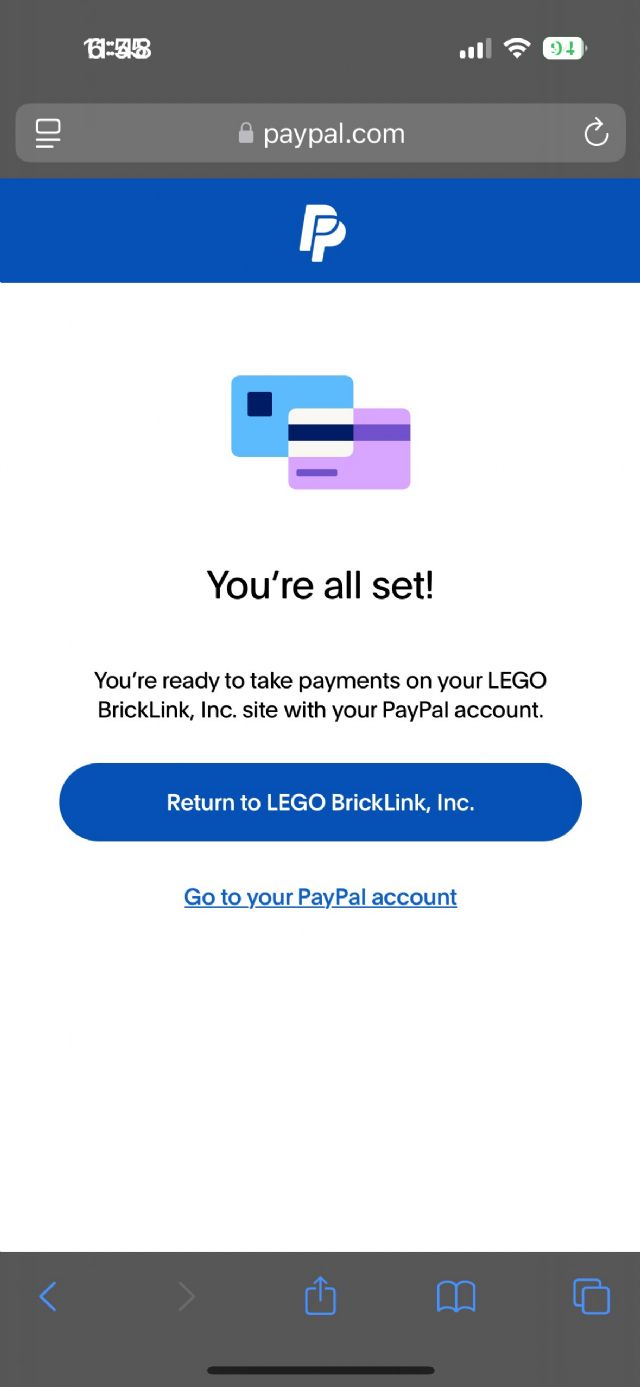
)
)
)
