Hi, I want to build a set, but before I buy it, I want to see what pieces of
the set I have in my inventory. I can click on “items in my wanted list” on the
inventory page and it shows the pieces in my store, but it doesn’t show how many
of those pieces I actually need for the set. For example, I have 10 of one piece
but may only need 4 of them or 15 of them. It just shows I have 10 of them. Any
way to see exactly the quantity I have in my store that are actually needed?
Kind of an over/under type of display. Thanks
Hi, I want to build a set, but before I buy it, I want to see what pieces of
the set I have in my inventory. I can click on “items in my wanted list” on the
inventory page and it shows the pieces in my store, but it doesn’t show how many
of those pieces I actually need for the set. For example, I have 10 of one piece
but may only need 4 of them or 15 of them. It just shows I have 10 of them. Any
way to see exactly the quantity I have in my store that are actually needed?
Kind of an over/under type of display. Thanks
go to your store and shop just like you would in any other store. You cannot
buy, but you can see what you have
Hi, I want to build a set, but before I buy it, I want to see what pieces of
the set I have in my inventory. I can click on “items in my wanted list” on the
inventory page and it shows the pieces in my store, but it doesn’t show how many
of those pieces I actually need for the set. For example, I have 10 of one piece
but may only need 4 of them or 15 of them. It just shows I have 10 of them. Any
way to see exactly the quantity I have in my store that are actually needed?
Kind of an over/under type of display. Thanks
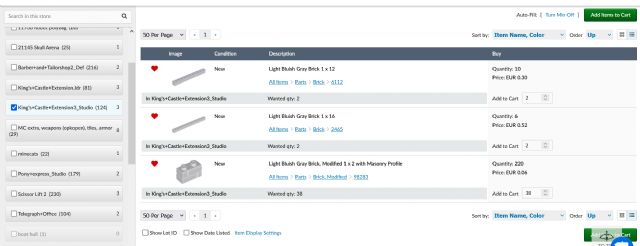
Yeah, you can do this with a workaround.
Go to your own shop. Select the wanted list that contains the parts of the set
you want to buy.
Click Auto-fill: Min. Here's an example from my own shop.
You can even add them your cart to get a 1 page list. (But of course you can't
check out)
Hi, I want to build a set, but before I buy it, I want to see what pieces of
the set I have in my inventory. I can click on “items in my wanted list” on the
inventory page and it shows the pieces in my store, but it doesn’t show how many
of those pieces I actually need for the set. For example, I have 10 of one piece
but may only need 4 of them or 15 of them. It just shows I have 10 of them. Any
way to see exactly the quantity I have in my store that are actually needed?
Kind of an over/under type of display. Thanks
I'm given to understand that Brickstore makes this easy.


 USA, Nebraska


 Netherlands, Overijssel