Discussion Forum
:
Thread
365427
Author:
macebobo
Posted:
Dec 17, 2024 21:07
Subject:
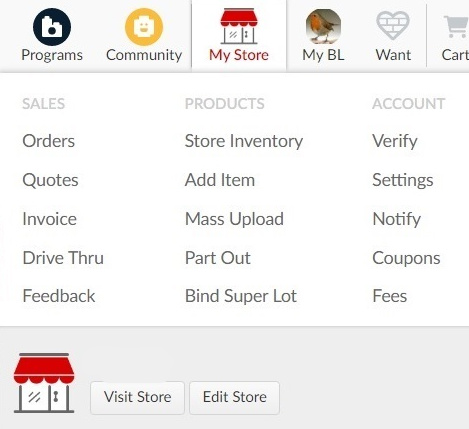
Old My Store Links
Viewed:
93
times
Topic:
Help
Report:
Report this post
Cancel
Reply
BrickLink
ID Card
macebobo
(3161)
Location:
USA
, Oregon
Member Since
Contact
Type
Status
Apr 3, 2016
Seller
Store:
MacsBricks
Sales
Orders:
https://www.bricklink.com/orderReceived.asp
Quotes:
https://www.bricklink.com/myQuotation.asp
Invoice :
https://www.bricklink.com/orderInvoice.asp
Drive Thru:
https://www.bricklink.com/orderDriveThru.asp
Feedback:
https://www.bricklink.com/feedbackPost.asp?iAm=B
Products
Store Inventory:
https://www.bricklink.com/inventory.asp
Add Item:
https://www.bricklink.com/inventoryAdd.asp
Mass Upload:
https://www.bricklink.com/invXML.asp
Part Out:
https://www.bricklink.com/invSet.asp
Bind Super Lot:
https://www.bricklink.com/inventoryBind.asp
Account
Verify:
https://www.bricklink.com/v3/mystore/SellerVerification.page
Settings:
https://www.bricklink.com/v2/mystore/display.page
Notify:
https://www.bricklink.com/invNotify.asp
Coupons:
https://www.bricklink.com/orderCoupons.asp?v=M
Fees:
https://www.bricklink.com/v2/mystore/fee.page
Visit Store (unique to each store):
https://store.bricklink.com/
{YourUserName}
example for macebobo's store
https://store.bricklink.com/macebobo
Edit Store:
https://www.bricklink.com/v2/mystore/display.page


 USA, Oregon