in the inventory there is a box to click to show items you have marked to retain
with zero quantity. I just uploaded new inventory and forgot to mark that in
Brick Store... How do I pull up everything not marked to retain so that I can
change it?
in the inventory there is a box to click to show items you have marked to retain
with zero quantity. I just uploaded new inventory and forgot to mark that in
Brick Store... How do I pull up everything not marked to retain so that I can
change it?
you can select your entire inventory and mark it as such on this page
https://www.bricklink.com/inventory.asp
(just a reminder before using this page its always best to do an inventory backup
with brickstore just in case)
in the inventory there is a box to click to show items you have marked to retain
with zero quantity. I just uploaded new inventory and forgot to mark that in
Brick Store... How do I pull up everything not marked to retain so that I can
change it?
you can select your entire inventory and mark it as such on this page
https://www.bricklink.com/inventory.asp
(just a reminder before using this page its always best to do an inventory backup
with brickstore just in case)
Ps I circled the wrong on in the image it’s the one above 😅
in the inventory there is a box to click to show items you have marked to retain
with zero quantity. I just uploaded new inventory and forgot to mark that in
Brick Store... How do I pull up everything not marked to retain so that I can
change it?
you can select your entire inventory and mark it as such on this page
https://www.bricklink.com/inventory.asp
(just a reminder before using this page its always best to do an inventory backup
with brickstore just in case)
That's the cheating way. There are some items I didn't want this applied
to because I'm neurotic and I would need Penguin Publishing to help write
the novel. LOL.
But so be it, it's not going to kill anyone if I mark them all.
in the inventory there is a box to click to show items you have marked to retain
with zero quantity. I just uploaded new inventory and forgot to mark that in
Brick Store... How do I pull up everything not marked to retain so that I can
change it?
you can select your entire inventory and mark it as such on this page
https://www.bricklink.com/inventory.asp
(just a reminder before using this page its always best to do an inventory backup
with brickstore just in case)
That's the cheating way. There are some items I didn't want this applied
to because I'm neurotic and I would need Penguin Publishing to help write
the novel. LOL.
But so be it, it's not going to kill anyone if I mark them all.
The other option would be to download your store into brickstore and then
sort by retain then manually update all the ones you want to change


 USA, Ohio


 Canada, Ontario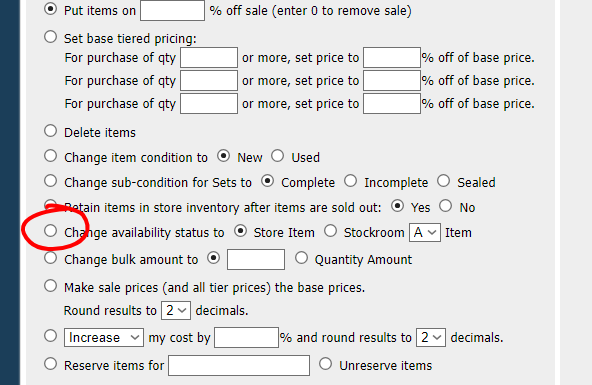
 The other option would be to download your store into brickstore and then