Discussion Forum: Thread 361434

 Author: batman11223 View Messages Posted By batman11223
 Posted: Aug 27, 2024 19:59
 Subject: How to manual invoice certain orders
 Viewed: 102 times
 Topic: Selling
 Report:
Cancel Message
Cancel
Reply to Message
Reply
BrickLink
ID Card

batman11223 (676)

Location:  USA, Ohio
Member Since Contact Type Status
Jun 24, 2018 Contact Member Seller
Buying Privileges - OKSelling Privileges - OK
Store: Macgyverstud
How to manual invoice certain orders when an item over a certain dimension exists.
I am trying to make sure that when someone buys a set from me, I have the opportunity
to manually invoice them the shipping rate, rather than instant check out
 Author: peregrinator View Messages Posted By peregrinator
 Posted: Aug 27, 2024 20:18
 Subject: Re: How to manual invoice certain orders
 Viewed: 61 times
 Topic: Selling
 Report:
Cancel Message
Cancel
Reply to Message
Reply
BrickLink
ID Card

peregrinator (1091)

Location:  USA, New Jersey
Member Since Contact Type Status
Jan 21, 2003 Contact Member Seller
Buying Privileges - OKSelling Privileges - OK
Store: Faber Family Bricks
In Selling, batman11223 writes:
  How to manual invoice certain orders when an item over a certain dimension exists.
I am trying to make sure that when someone buys a set from me, I have the opportunity
to manually invoice them the shipping rate, rather than instant check out

Set the package type for each of the items to "Manual Only"
 Author: popsicle View Messages Posted By popsicle
 Posted: Aug 27, 2024 23:08
 Subject: Re: How to manual invoice certain orders
 Viewed: 57 times
 Topic: Selling
 Report:
Cancel Message
Cancel
Reply to Message
Reply
BrickLink
ID Card

popsicle (6773)

Location:  USA, Washington
Member Since Contact Type Status
Feb 21, 2006 Contact Member Seller
Buying Privileges - OKSelling Privileges - OK
Store: ConstrucToys
In Selling, batman11223 writes:
  How to manual invoice certain orders when an item over a certain dimension exists.
I am trying to make sure that when someone buys a set from me, I have the opportunity
to manually invoice them the shipping rate, rather than instant check out

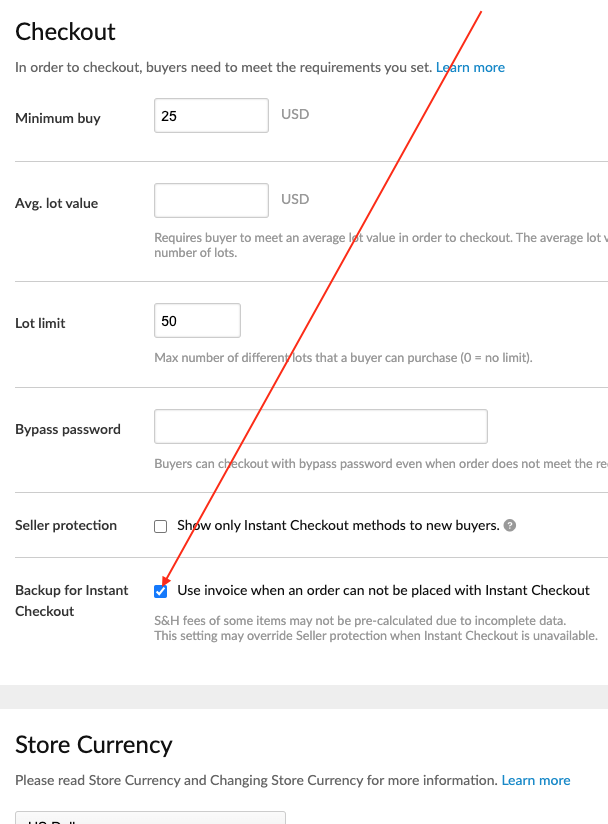
Set your various shipping methods somewhere below the parameters of the sets
(weight and size) you wish to sell, and simply select:
https://www.bricklink.com/v2/mystore/management.page

Works for us...