Discussion Forum: Thread 361163

 Author: SiKenobi View Messages Posted By SiKenobi
 Posted: Aug 18, 2024 13:35
 Subject: Availability Higher Than Physical
 Viewed: 191 times
 Topic: Technical Issues
 Report:
Cancel Message
Cancel
Reply to Message
Reply
BrickLink
ID Card

SiKenobi (948)

Location:  United Kingdom, Northern Ireland
Member Since Contact Type Status
Apr 17, 2020 Contact Member Seller
Buying Privileges - OKSelling Privileges - OK
Store: Piece OUT!
HI guys,

There are weird things happening to my stock quantities and I wanted to see if
this is happening with other sellers.

Over the past few days - say, since 11th August - I have had customers ordering
quantities of items higher than I have physically available.

At first it was just the odd item but now it seems to be happening with every
order I'm getting, but only the 1 or 2 items, not EVERY item.

I'm trying to see if I have parted out sets into my Store instead of my Stockroom
as I initially do, but can't figure out how to see where my parted out sets
have gone.

Is this happening to other sellers?
Is there a way to find out where you have sent your Parted Out sets to?

"Help me Obi-Wan Kenobi! You're my only hope!"

Simon

Piece OUT!
 Author: 1001bricks View Messages Posted By 1001bricks
 Posted: Aug 18, 2024 13:42
 Subject: (Cancelled)
 Viewed: 53 times
 Topic: Inventories
Cancel Message
Cancel
BrickLink
ID Card

1001bricks (55649)

Location:  France, Provence-Alpes-Côte d'Azur
Member Since Contact Type Status
Sep 6, 2005 Contact Member Seller
Buying Privileges - OKSelling Privileges - OK
Store: 1001bricks
(Cancelled)
 Author: 1001bricks View Messages Posted By 1001bricks
 Posted: Aug 18, 2024 13:44
 Subject: Re: Availability Higher Than Physical
 Viewed: 88 times
 Topic: Technical Issues
 Report:
Cancel Message
Cancel
Reply to Message
Reply
BrickLink
ID Card

1001bricks (55649)

Location:  France, Provence-Alpes-Côte d'Azur
Member Since Contact Type Status
Sep 6, 2005 Contact Member Seller
Buying Privileges - OKSelling Privileges - OK
Store: 1001bricks
In Inventories, SiKenobi writes:
  Is this happening to other sellers?
Is there a way to find out where you have sent your Parted Out sets to?

I could prove it happened twice in 17+ years (at least since I'm checking
carefully).

In short it's extremely rare, and can be due to error in some consolidation/rollback
after night maintenance or after a detected problem they had...

Most of the times it's human error on your side (sorry to say).

Use BrickStore exclusively to upload/update; this way you will also save locally
what you've done (as files).

Also, you've to either download your Shop Inventory as XML, or far better,
simply
using BrickStore like once per week (depending you shop size, orders...)

Then only you'll know something happened, and in most cases (almost all)
you'll notice it was an error or something you forgot you did on your side).

HTH?
 Author: SiKenobi View Messages Posted By SiKenobi
 Posted: Aug 18, 2024 16:05
 Subject: Re: Availability Higher Than Physical
 Viewed: 65 times
 Topic: Inventories
 Report:
Cancel Message
Cancel
Reply to Message
Reply
BrickLink
ID Card

SiKenobi (948)

Location:  United Kingdom, Northern Ireland
Member Since Contact Type Status
Apr 17, 2020 Contact Member Seller
Buying Privileges - OKSelling Privileges - OK
Store: Piece OUT!
Well thank you for getting back to me so quickly

You know what?

It probably IS my fault, I'm still quite new to all this so it wouldn't
surprise me in the least.

Is there a way to check to see where you have parted out sets to, be it either
your Store or to your Stockroom?

Cheers in advance

Simon

Piece OUT!
 Author: Give.Me.A.Brick View Messages Posted By Give.Me.A.Brick
 Posted: Aug 18, 2024 16:36
 Subject: Re: Availability Higher Than Physical
 Viewed: 98 times
 Topic: Inventories
 Report:
Cancel Message
Cancel
Reply to Message
Reply
BrickLink
ID Card

Give.Me.A.Brick (11004)

Location:  Portugal
Member Since Contact Type Status
Nov 25, 2002 Contact Member Seller
Buying Privileges - OKSelling Privileges - OK
Store: Give Me A Brick ϟ USA ✔
In Inventories, SiKenobi writes:
  Well thank you for getting back to me so quickly

You know what?

It probably IS my fault, I'm still quite new to all this so it wouldn't
surprise me in the least.

Is there a way to check to see where you have parted out sets to, be it either
your Store or to your Stockroom?

Cheers in advance

Simon

Piece OUT!

Not sure if this helps but here's the part out log if you have parted out
your sets directly in the BrickLink platform.

https://www.bricklink.com/inventoryInvLog.asp

It won't work if you've parted them using a 3rd party software as BrickStore.

Also, you can see if you have all the pieces for a certain set in your inventory
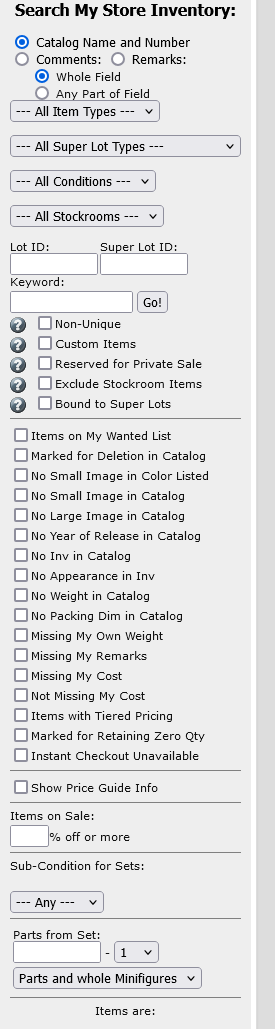
page (Parts from Set) in the shotscreen below:
 
 Author: 1001bricks View Messages Posted By 1001bricks
 Posted: Aug 18, 2024 19:52
 Subject: Re: Availability Higher Than Physical
 Viewed: 54 times
 Topic: Inventories
 Report:
Cancel Message
Cancel
Reply to Message
Reply
BrickLink
ID Card

1001bricks (55649)

Location:  France, Provence-Alpes-Côte d'Azur
Member Since Contact Type Status
Sep 6, 2005 Contact Member Seller
Buying Privileges - OKSelling Privileges - OK
Store: 1001bricks
In Inventories, SiKenobi writes:
  Is there a way to check to see where you have parted out sets to, be it either
your Store or to your Stockroom?

It'll be hard to fix the past not knowing what you did.
You could've opened a BrickLink page, type "122" in qty instead of
"12" or such typo.

What's important is to fix current availabilities/quantities, and then keep
track of everything you do using BrickStore, and the shop inventory from time
to time. So you can track what happened and when, and fix your procedures