When you receive an order, what is your process in filling it?
This is my first one, so I'm finding it a bit confusing. For instance, it
took a bit of clicking around to find out what the customer actually bought.
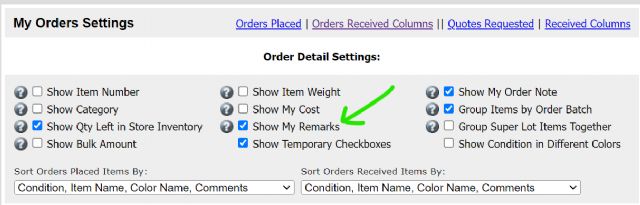
Also, at that point the software didn't show me my remarks, so I didn't
know where to look for the parts. Fortunately, it was all minifigs that were
easy for me to find.
Now that I've picked the order I've changed the status to "packed."
This afternoon, I'll change it to "shipped," then I'm guessing
once he receives it, there will be a final step.
Any pointers on how to pick and finish out an order where the Bricklink software
is concerned would be greatly appreciated.
Thanks! Very excited to be filling my first order!
When you receive an order, what is your process in filling it?
This is my first one, so I'm finding it a bit confusing. For instance, it
took a bit of clicking around to find out what the customer actually bought.
Also, at that point the software didn't show me my remarks, so I didn't
know where to look for the parts. Fortunately, it was all minifigs that were
easy for me to find.
Now that I've picked the order I've changed the status to "packed."
This afternoon, I'll change it to "shipped," then I'm guessing
once he receives it, there will be a final step.
Any pointers on how to pick and finish out an order where the Bricklink software
is concerned would be greatly appreciated.
Thanks! Very excited to be filling my first order!
Robert Morse
Bob's Your Uncle Bricks
Go to "My Store" in the top menu, and select orders. You can then click
on the order number and it will show you the items in the order, with remarks.
When you receive an order, what is your process in filling it?
This is my first one, so I'm finding it a bit confusing. For instance, it
took a bit of clicking around to find out what the customer actually bought.
Also, at that point the software didn't show me my remarks, so I didn't
know where to look for the parts. Fortunately, it was all minifigs that were
easy for me to find.
Now that I've picked the order I've changed the status to "packed."
This afternoon, I'll change it to "shipped," then I'm guessing
once he receives it, there will be a final step.
Any pointers on how to pick and finish out an order where the Bricklink software
is concerned would be greatly appreciated.
Thanks! Very excited to be filling my first order!
Robert Morse
Bob's Your Uncle Bricks
Go to "My Store" in the top menu, and select orders. You can then click
on the order number and it will show you the items in the order, with remarks.
Got it! Thanks everyone for your responses. It was a big help!
When you receive an order, what is your process in filling it?
This is my first one, so I'm finding it a bit confusing. For instance, it
took a bit of clicking around to find out what the customer actually bought.
Also, at that point the software didn't show me my remarks, so I didn't
know where to look for the parts. Fortunately, it was all minifigs that were
easy for me to find.
When you receive an order, what is your process in filling it?
This is my first one, so I'm finding it a bit confusing. For instance, it
took a bit of clicking around to find out what the customer actually bought.
Also, at that point the software didn't show me my remarks, so I didn't
know where to look for the parts. Fortunately, it was all minifigs that were
easy for me to find.
When you receive an order, what is your process in filling it?
This is my first one, so I'm finding it a bit confusing. For instance, it
took a bit of clicking around to find out what the customer actually bought.
Also, at that point the software didn't show me my remarks, so I didn't
know where to look for the parts. Fortunately, it was all minifigs that were
easy for me to find.
Now that I've picked the order I've changed the status to "packed."
This afternoon, I'll change it to "shipped," then I'm guessing
once he receives it, there will be a final step.
Any pointers on how to pick and finish out an order where the Bricklink software
is concerned would be greatly appreciated.
Thanks! Very excited to be filling my first order!
Robert Morse
Bob's Your Uncle Bricks
Also, noticed that although I have my shipping at $4.99 flat rate, the buyer
paid $3.00.
I'm guessing that I have to go in there somewhere and actually set it to
the $4.99, but can't figure out where.
Also, noticed that although I have my shipping at $4.99 flat rate, the buyer
paid $3.00.
I'm guessing that I have to go in there somewhere and actually set it to
the $4.99, but can't figure out where.
You aren't ready to sell.
Close your store until you've read the Bricklink seller *and* buyer help
pages and watched some youtube instructional videos. Lots of resources out there.
Then, get your store set up properly.
If you get stuck somewhere you can always come here for help.
You already got burned for $2 of shipping on your 1st order.
When you receive an order, what is your process in filling it?
This is my first one, so I'm finding it a bit confusing. For instance, it
took a bit of clicking around to find out what the customer actually bought.
Also, at that point the software didn't show me my remarks, so I didn't
know where to look for the parts. Fortunately, it was all minifigs that were
easy for me to find.
Now that I've picked the order I've changed the status to "packed."
This afternoon, I'll change it to "shipped," then I'm guessing
once he receives it, there will be a final step.
Any pointers on how to pick and finish out an order where the Bricklink software
is concerned would be greatly appreciated.
Thanks! Very excited to be filling my first order!
Robert Morse
Bob's Your Uncle Bricks
Honestly, if I were you I would go over every inch of the seller side of BrickLink
before I started selling. Click every button, read the relevant Help pages, follow
some Forum threads of new sellers asking for advice. In other words, be proactive
and learn the basics at least.
Good luck,
~Jen
PS. You prices for your shipping are set by your shipping settings. Whatever
you set there is what the system is charging them. BrickLink does not have automatic
features for selling like other platforms do. And USPS First Class mail is no
longer for packages. If you aren't using Ground Advantage, you are out of
date.
When you receive an order, what is your process in filling it?
This is my first one, so I'm finding it a bit confusing. For instance, it
took a bit of clicking around to find out what the customer actually bought.
Also, at that point the software didn't show me my remarks, so I didn't
know where to look for the parts. Fortunately, it was all minifigs that were
easy for me to find.
Now that I've picked the order I've changed the status to "packed."
This afternoon, I'll change it to "shipped," then I'm guessing
once he receives it, there will be a final step.
Any pointers on how to pick and finish out an order where the Bricklink software
is concerned would be greatly appreciated.
Thanks! Very excited to be filling my first order!
Robert Morse
Bob's Your Uncle Bricks
Honestly, if I were you I would go over every inch of the seller side of BrickLink
before I started selling. Click every button, read the relevant Help pages, follow
some Forum threads of new sellers asking for advice. In other words, be proactive
and learn the basics at least.
Good luck,
~Jen
PS. You prices for your shipping are set by your shipping settings. Whatever
you set there is what the system is charging them. BrickLink does not have automatic
features for selling like other platforms do. And USPS First Class mail is no
longer for packages. If you aren't using Ground Advantage, you are out of
date.
Thank you. I've changed it to Ground Advantage. BTW the post office said
they've replaced First Class with Ground Advantage. First Class is no longer
an option at my local post office.
So that's one problem solved. Any advice on how to set a flat shipping rate
of $4.99? I'm not able to find that setting.
When you receive an order, what is your process in filling it?
This is my first one, so I'm finding it a bit confusing. For instance, it
took a bit of clicking around to find out what the customer actually bought.
Also, at that point the software didn't show me my remarks, so I didn't
know where to look for the parts. Fortunately, it was all minifigs that were
easy for me to find.
Now that I've picked the order I've changed the status to "packed."
This afternoon, I'll change it to "shipped," then I'm guessing
once he receives it, there will be a final step.
Any pointers on how to pick and finish out an order where the Bricklink software
is concerned would be greatly appreciated.
Thanks! Very excited to be filling my first order!
Robert Morse
Bob's Your Uncle Bricks
Honestly, if I were you I would go over every inch of the seller side of BrickLink
before I started selling. Click every button, read the relevant Help pages, follow
some Forum threads of new sellers asking for advice. In other words, be proactive
and learn the basics at least.
Good luck,
~Jen
PS. You prices for your shipping are set by your shipping settings. Whatever
you set there is what the system is charging them. BrickLink does not have automatic
features for selling like other platforms do. And USPS First Class mail is no
longer for packages. If you aren't using Ground Advantage, you are out of
date.
Thank you. I've changed it to Ground Advantage. BTW the post office said
they've replaced First Class with Ground Advantage. First Class is no longer
an option at my local post office.
So that's one problem solved. Any advice on how to set a flat shipping rate
of $4.99? I'm not able to find that setting.
When you receive an order, what is your process in filling it?
This is my first one, so I'm finding it a bit confusing. For instance, it
took a bit of clicking around to find out what the customer actually bought.
Also, at that point the software didn't show me my remarks, so I didn't
know where to look for the parts. Fortunately, it was all minifigs that were
easy for me to find.
Now that I've picked the order I've changed the status to "packed."
This afternoon, I'll change it to "shipped," then I'm guessing
once he receives it, there will be a final step.
Any pointers on how to pick and finish out an order where the Bricklink software
is concerned would be greatly appreciated.
Thanks! Very excited to be filling my first order!
Robert Morse
Bob's Your Uncle Bricks
Honestly, if I were you I would go over every inch of the seller side of BrickLink
before I started selling. Click every button, read the relevant Help pages, follow
some Forum threads of new sellers asking for advice. In other words, be proactive
and learn the basics at least.
Good luck,
~Jen
PS. You prices for your shipping are set by your shipping settings. Whatever
you set there is what the system is charging them. BrickLink does not have automatic
features for selling like other platforms do. And USPS First Class mail is no
longer for packages. If you aren't using Ground Advantage, you are out of
date.
Thank you. I've changed it to Ground Advantage. BTW the post office said
they've replaced First Class with Ground Advantage. First Class is no longer
an option at my local post office.
So that's one problem solved. Any advice on how to set a flat shipping rate
of $4.99? I'm not able to find that setting.
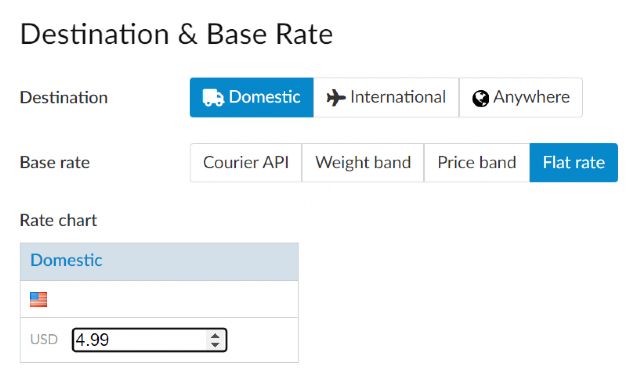
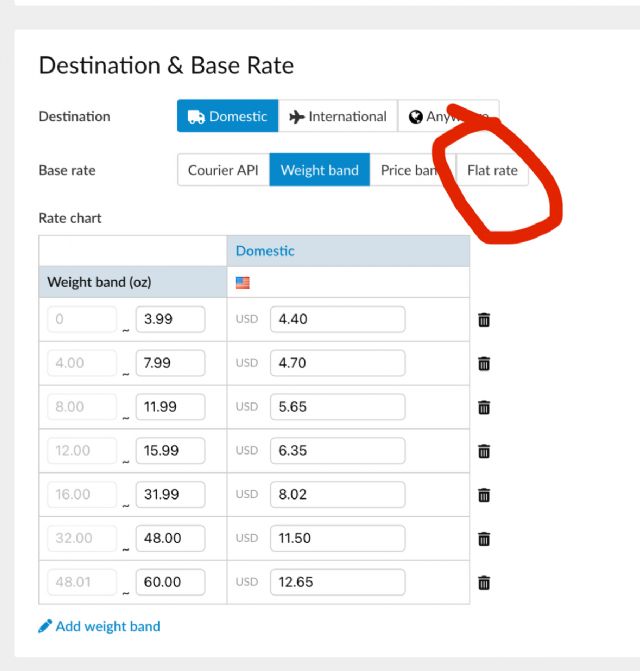
Edit the shipping method and follow the pictures
Thank you. I'm pretty sure I did that correctly. I chose flat rate then
manually input the amount of $4.99 though as opposed to choosing one off the
menu. Hope it works.
Thank you. I've changed it to Ground Advantage. BTW the post office said
they've replaced First Class with Ground Advantage. First Class is no longer
an option at my local post office.
So that's one problem solved. Any advice on how to set a flat shipping rate
of $4.99? I'm not able to find that setting.
When you receive an order, what is your process in filling it?
This is my first one, so I'm finding it a bit confusing. For instance, it
took a bit of clicking around to find out what the customer actually bought.
Also, at that point the software didn't show me my remarks, so I didn't
know where to look for the parts. Fortunately, it was all minifigs that were
easy for me to find.
Now that I've picked the order I've changed the status to "packed."
This afternoon, I'll change it to "shipped," then I'm guessing
once he receives it, there will be a final step.
Any pointers on how to pick and finish out an order where the Bricklink software
is concerned would be greatly appreciated.
Thanks! Very excited to be filling my first order!
Robert Morse
Bob's Your Uncle Bricks
My advice would be to start of with offering manual invoice first before setting
up instant checkout shipping rules since this will give you a chance to get a
better feel for the types of orders you receive along with allowing you to check
weights, package sizes and shipping charges prior to invoicing and taking payment


 USA, Michigan


 United Kingdom, England


)
)